One SIP account, one number
You enter the SIP account and number once (Phone). The agent answers on it, your team calls from it — no extra number, licence or phone system from Kolio.
Kolio Softphone is a softphone in the browser: your team calls customers straight from the CRM (from the Conversations view or by searching a contact by name), on the same number the AI agent answers — no phone system, no desk phones, nothing to install. Every call is logged on the contact with direction, duration and transcript; live call transcription is configurable and can be switched off.
7 days free · no credit card · the same SIP account as the agent
Written by the Kolio team · updated
Kolio Softphone is a softphone in the browser: your team calls customers straight from the CRM, on the same number the AI agent answers — no phone system, no desk phones, nothing to install. Every call is logged on the contact with direction, duration and transcript.
| Item | Needed? | Why |
|---|---|---|
| A modern browser (Chrome, Edge, Firefox, Safari) | Yes | The softphone is part of the Kolio web app; audio runs over WebRTC, no plug-ins. |
| A headset with a microphone | Yes | You pick the microphone and speaker in the softphone window; a headset prevents echo. |
| A SIP account with a telephony provider | Yes | The same account and number the agent uses — entered once under Settings → Telephony. |
| The “Softphone” permission for a team member | Yes | The owner grants it under Users; without it the button does not appear. |
| A phone system (PBX) | No | Kolio telephony routes the calls — nothing to buy, nothing to maintain. |
| Desk phones, VoIP hardware | No | Calls are made in the browser, on the computer you already have. |
| Software to install | No | Signing in to Kolio is enough; updates ship with the web app. |
| An extra phone number | No | Your team and the agent share one number — the customer sees one number. |
Facts from Kolio's setup: the SIP account and the Softphone section are on the Settings → Telephony page; the “Softphone (web phone)” permission is managed by the account owner.
The task owner writes no notes after the call: what the customer confirmed, what is still open and what was promised is in the transcript on the contact. The next team member who calls the customer reads the same thread in Conversations.
On a call with the agent the customer knows they are talking to an AI. On a softphone call two people are talking, so your company must tell the other party that the call is being transcribed — that duty is yours, not Kolio's. While transcribing, the softphone window shows the badge “Call is being transcribed” — a reminder for your team, not a substitute for informing the customer.
Transcription runs for the entire conversation, separately for each voice — yours and the customer's — so the transcript shows who said what. If you don't need transcripts of your team's calls, switch it off and pay only for transcribing the calls the agent answers.
A change to the toggle takes effect from the next softphone registration — refresh the page after saving. When transcription is not available on the installation, the toggle is greyed out and the saved choice is kept.
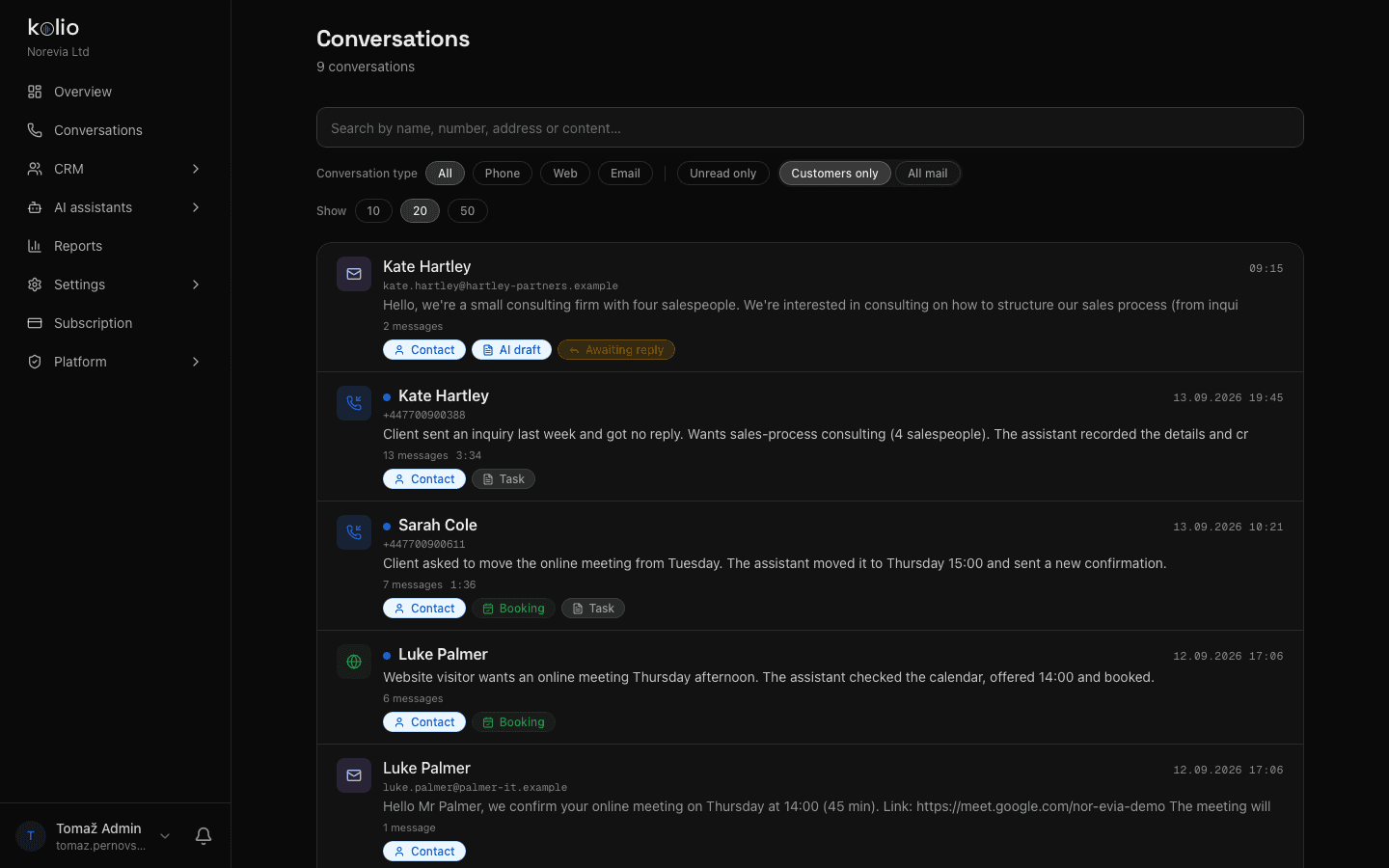
Every customer phone conversation or chat in the Conversations view has a “Call” button: when the softphone is registered, the call runs in the browser; when it isn't, the computer's phone app opens. No retyping the number.
Type a name, company or part of a number into the softphone field; Kolio suggests contacts from the CRM and a click on a match dials. Local and international forms of the same number (041… and +386 41…) match.
A finished call is a conversation with direction, duration, the team member's name and the transcript — in the Conversations view next to the agent's calls, web chats and email with the same customer, even when the contact does not exist yet (a thread by number).
You switch on the business softphone in Kolio yourself, with no technician: you already have the SIP account from setting up the agent; the rest is three toggles and a headset. It takes about ten minutes.
Under Settings → Telephony enter your provider's SIP account and the number the agent answers on. If the agent already takes calls, this step is done.
On the same page, switch on the toggle in the Softphone section; Kolio creates SIP credentials for your company. This is also where you choose whether your team's calls are transcribed live.
Under Users, tick the “Softphone (web phone)” permission for the members who will be calling. The owner has every permission automatically.
The member opens Kolio and a phone button appears in the corner. On the first call the browser asks for microphone access; in the softphone window they pick the microphone and speaker and dial by clicking Call next to a customer's conversation.
The Kolio softphone is part of the web app, so it opens in a mobile browser too, but it is built for everyday work in a desktop browser with a headset. Safari does not allow choosing a speaker — audio goes to the default device; Chrome, Edge and Firefox let you pick both the microphone and the speaker.
The Kolio softphone is part of the Kolio subscription and is switched on with one toggle, with no extra licence. From your telephony provider you need the same SIP account the agent already uses; how many calls can run at once on that account is set by your provider.
The customer sees the same number: the Kolio softphone calls through the same SIP account as the AI agent, so the company has one number for incoming calls answered by the agent and for call-backs from your team.
Kolio does not record softphone calls as audio; with transcription on it saves a text transcript of the conversation on the contact, and with transcription off it saves only the direction, duration and the team member who called. The transcription toggle is under Settings → Telephony, Softphone section.
Informing the customer is your company's duty: on a softphone call two people are talking, so your team must tell the other party about the transcription themselves. While transcribing, Kolio shows the badge “Call is being transcribed” in the softphone window, which alerts the team member but does not replace informing the customer.
Kolio still saves the call as a conversation with the dialled number, visible in the Conversations view as a thread by number. Once your team creates the contact or adds that number to it, calls with the same number appear on the contact.
The Kolio softphone has a dial pad for touch-tone (DTMF) input during a call, so your team can choose options in the phone menus of the companies it calls. Muting the microphone and hanging up are available as well.
The SIP account the agent uses is enough. Switch on the softphone, grant the permission and your team calls the first customer from a contact. No credit card.
7 days free · cancel any time