For your team · CRM and tasks

CRM with AI call centre.
This is where your team takes over.

Kolio is a CRM with AI call centre: the agent takes the conversation by phone, web or email, creates a contact and a task with a summary and transcript, and your team takes over — issues the quote, fulfils the order, closes the task. Calls, chats, email and appointments sit on one contact; roles and permissions govern access.

7 days free · no credit card · invite your team in minutes

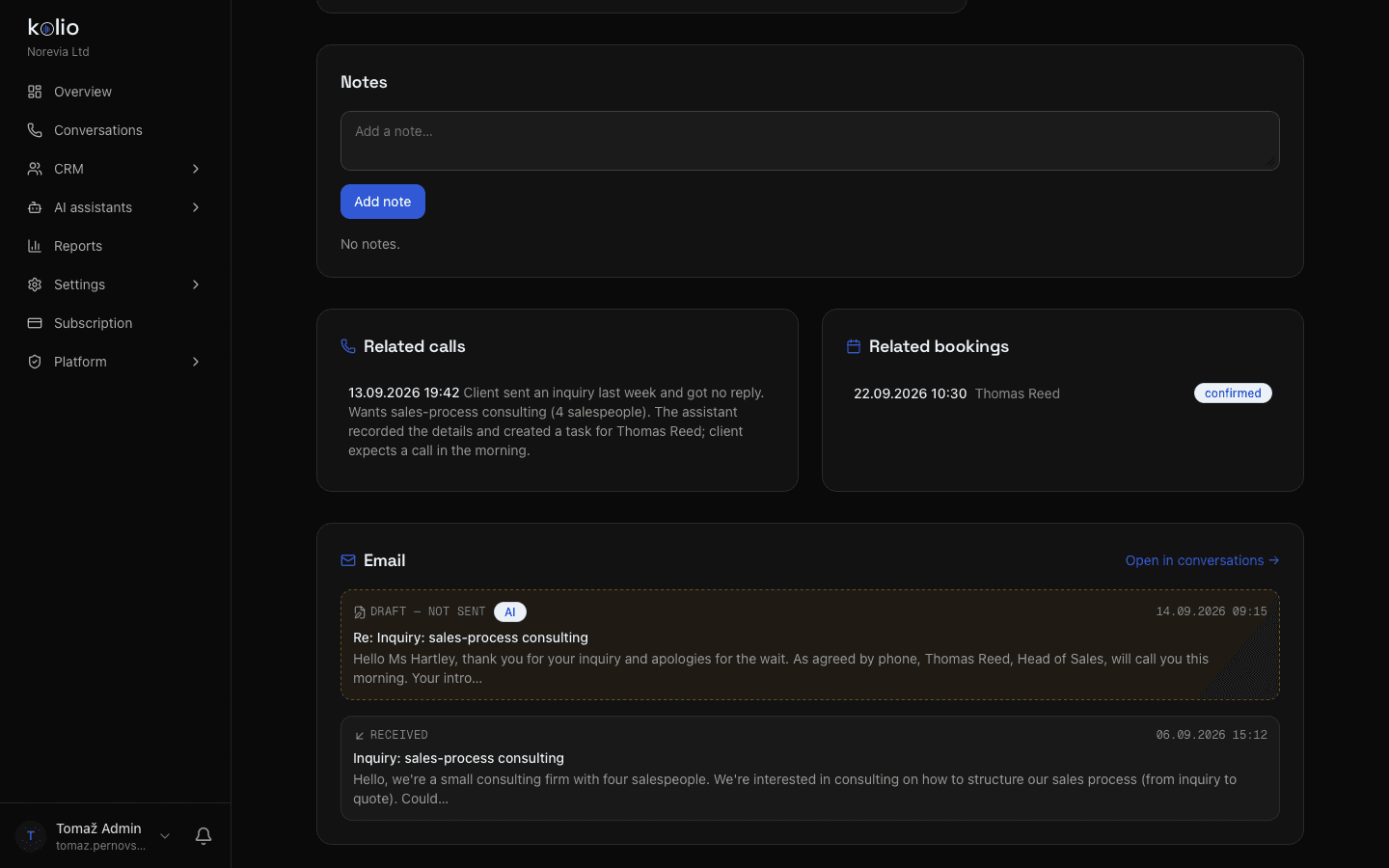
Kolio CRM — a customer's contact with linked calls, a confirmed appointment, a received email and the AI reply draft in one place
Kolio CRM: Kate Hartley's contact — linked calls, appointment, email and reply draft

By the Kolio team · updated

28 %
of their time salespeople spend actually selling; the rest goes to admin and looking for informationSource: Salesforce State of Sales, 5th ed.
42 h
average time companies take to respond to a web inquiry (2,241 companies)Source: Harvard Business Review, 2011
82 %
of buyers rate an immediate response to a sales question as important or very importantSource: HubSpot Research
From conversation to task

Tasks from phone calls: how does a conversation become a task?

Tasks from phone calls are created in Kolio automatically: when the agent realises during the conversation that a decision from your team is needed — a quote, an order, a complaint, a call-back — it records the contact and creates a task with a title, assignee, priority, due date and a three-sentence summary. The same applies to web chat and email. Nothing is left in a transcript nobody reads: according to the Salesforce State of Sales report, salespeople spend only 28 % of their time actually selling, the rest goes to admin and looking for information — a task with a summary saves them that part.

Title, assignee, priority, due date

A task has a title that says what it is about, an assignee from your team, a priority from zero to three stars and a due date. You set the assignee in the instructions — one default, or by area.
Task createdapi:Lina

Call back: Kate Hartley — inquiry about sales-process consulting

AssigneeTRThomas Reed· Head of Sales
ContactKate Hartley · Hartley & Partners
PriorityHighDuetoday

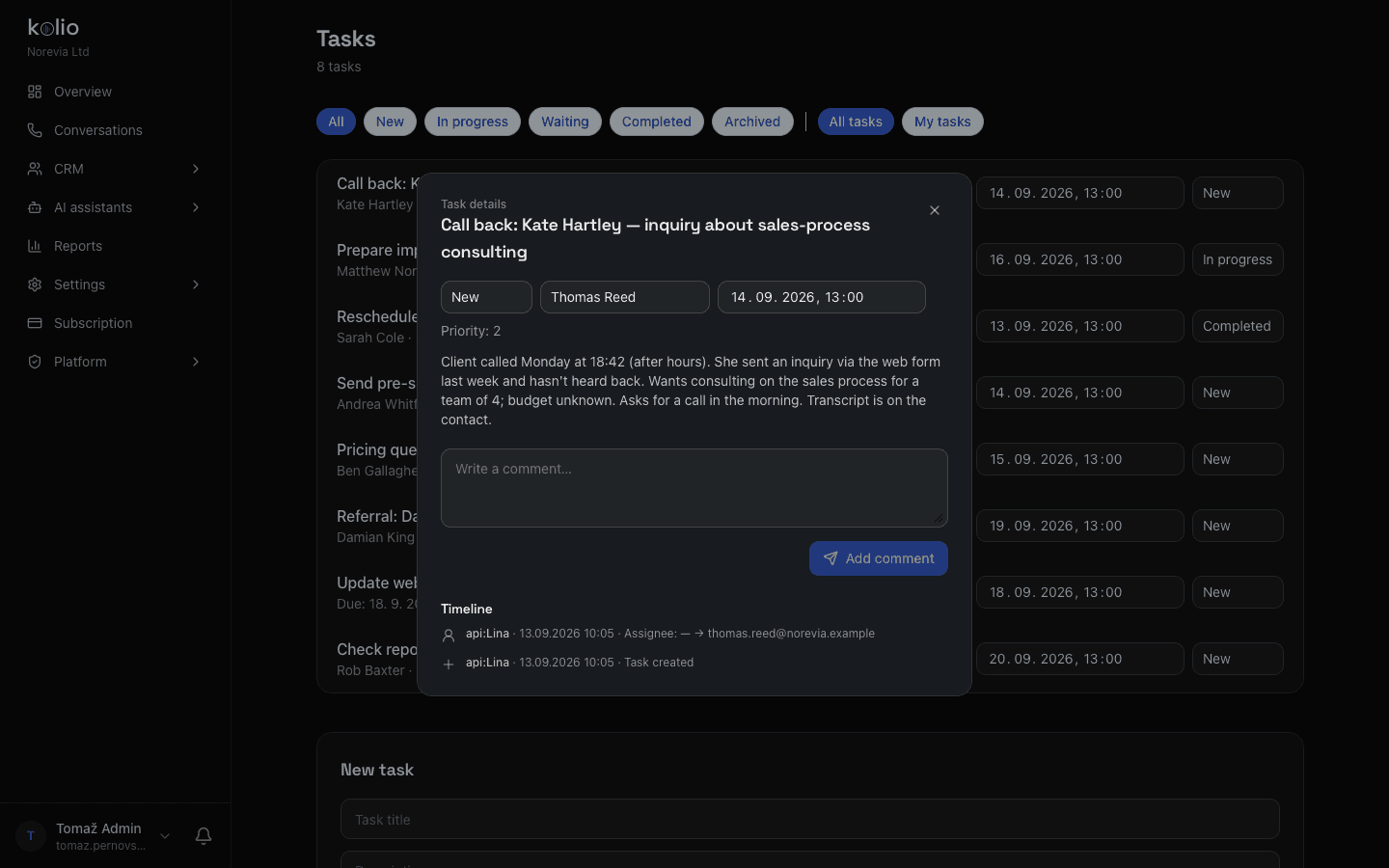
Client called Monday at 18:42 (after hours). She sent an inquiry via the web form last week and hasn't heard back. Wants consulting on the sales process for a team of 4; budget unknown. Asks for a call in the morning. Transcript is on the contact.

Timeline
  1. api:Lina · Mon 18:46
    Task created from a phone conversation
  2. api:Lina · Mon 18:46
    Assignee: Thomas Reed · priority: high
Kolio · task created by the agent Lina from a call to the demo company Norevia Ltd · Monday 18:46

Three-sentence summary

What the customer wants, what the agent has already said or booked, and what is waiting for your team. The salesperson doesn't listen to a recording to find out what it's about.

Transcript on the contact

The full transcript of the call, chat or email thread sits on the contact, one click from the task. In the Conversations view the conversation carries a "task" badge, so the team can see what is already being handled.

Notification to the assignee

The assignee gets an email notification when the task is assigned — also when the agent or an external system assigns it via the API. Self-assigned tasks send no notification.

Kolio CRM — sales task created by the AI agent from a phone call: assignee, priority, due date, inquiry summary and timeline with the conversation transcript
Kolio CRM: the task as your sales team sees it — assignee, priority, due date, summary and timeline
Contact with every channel

All conversations in one place: what does your team see on a contact?

All conversations with a customer are in one place in the Kolio CRM — on the contact: phone call transcripts, web chats, received and sent email, appointments from the Calendar, tasks and notes. When the customer calls again, the agent recognises them by phone number and picks up where it left off instead of asking again. A contact has a name, company, phone, email, tags and a recorded GDPR consent.

Call transcripts in the CRM

Call transcripts in the CRM are automatic for every call the agent answers on your number (Phone). Calls your team makes via the Softphone are transcribed live by Kolio — the transcription is configurable and can be switched off.

Web chat and email

A chat with the Web agent and an email thread with the Email agent attach to the same contact by email address. The AI reply draft is visible on the contact until your team sends it.

Appointments, tasks, notes

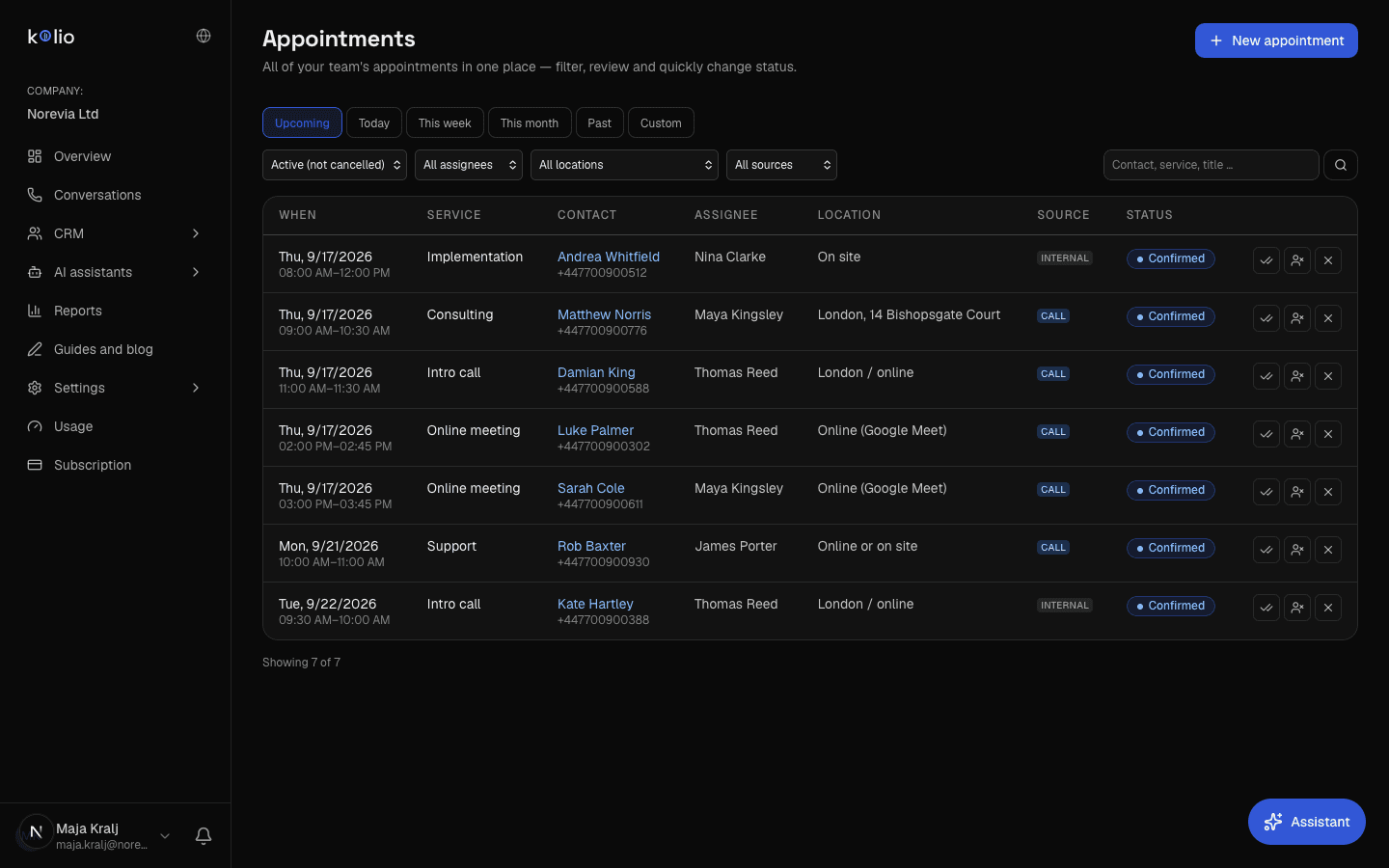
Every appointment the agent booked and every task sit on the contact with a status and an assignee. You also see all the company's appointments in the CRM → Appointments list: filters by period, status, member, location and source (call, chat, online booking, internal, API), quick status changes and a button for a new appointment. Any team member adds a note; its author is recorded.

Tags and search

Tag contacts ("VIP", "B2B", "complaint") and filter the list by tag. Tags are the same in the contact form and in the filter bar, so the counts never diverge.

Kolio CRM → Appointments: the demo company Norevia's appointment list with filters by period, status, assignee, location and source and quick status actions
How the team works

How does your team work with tasks: statuses, timeline, assignment and attachments?

Your team works with tasks in Kolio in five statuses — new, in progress, waiting, done, archived — with a "my tasks" filter and a priority. Every change is written to the task's timeline: who created it, took it over, moved the due date or changed the status, and who added a comment. Because a task can be changed by three sources — your team, the agent and an external system — every event records its origin, for an integration as "api:key name".

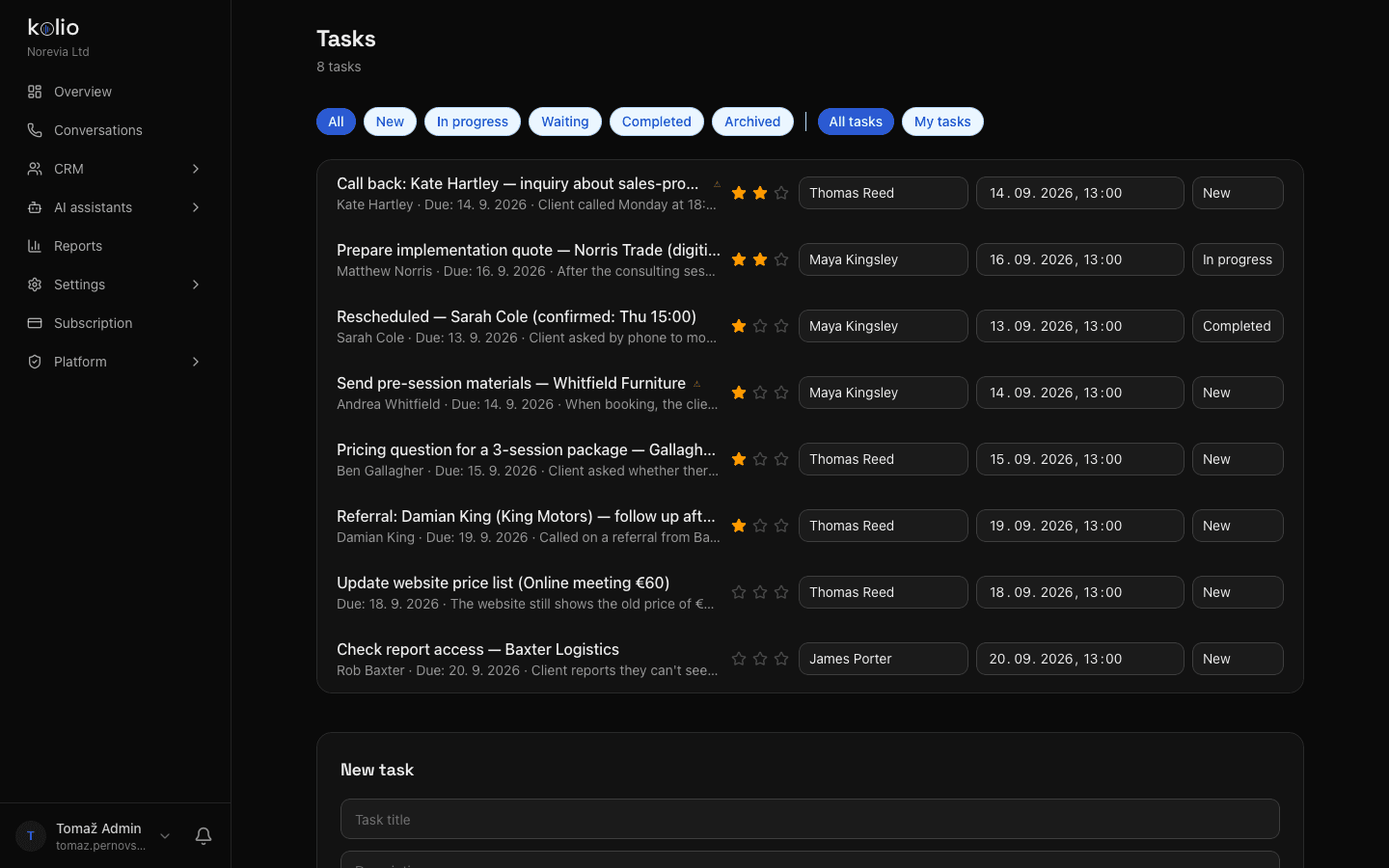
Kolio CRM — task list for your team with filters by status and assignee, star priority, assignee, due date and status of every task
Kolio CRM: the team's tasks at the demo company Norevia Ltd — status filters, "my tasks", priority, assignee, due date

Statuses and priority

New → in progress → waiting → done → archived. Priority from zero to three stars; the list filters by status and by assignee ("all tasks" / "my tasks").

Task timeline

Events "created", "assigned", "status", "priority", "due" and "comment" with author and time. Tasks created by the agent carry its signature, tasks from integrations the signature of the API key.

Attachments on comments

Your team attaches a PDF quote, an image or a screenshot to a task comment: PDF, PNG, JPEG, WebP or GIF, up to 10 MB per file and up to five files per comment. Only a signed-in member with permission can download the file, PDFs always as a download.

Kolio is a CRM with AI call centre: the agent takes the conversation by phone, web or email, creates a contact and a task with a summary and transcript, and your team takes over — issues the quote, fulfils the order, closes the task.

Roles and permissions

Who sees what? Owner, admin and team member roles and permissions

Access to the Kolio CRM is governed by three roles and thirteen permissions. The owner has every permission and none can be removed — the owner holds the subscription and is the only one who manages members. For members with the admin or team member role, the owner ticks exactly the permissions they need when inviting them; the in-app menu shows only the items a member can access, and the same permissions apply to any API key that member issues. A member sets their password via a one-time link valid for seven days.

Permissions in the Kolio CRM by role: the owner has all of them, admin and team members those the owner selects
PermissionWhat it opensowneradminagent
Contacts (CRM)contacts, notes, tags, GDPR export of a contactalwaysas selectedas selected
Taskstasks, timeline, comments with attachmentsalwaysas selectedas selected
Calendar and appointmentsappointments, moving, cancellingalwaysas selectedas selected
Services and availabilityservices, duration, schedules, blocksalwaysas selectedas selected
Call centre and transcriptsConversations view: calls, chats, emailalwaysas selectedas selected
AI agents (simulators)call and web simulator for testingalwaysas selectedas selected
Softphone (web phone)calling from the browser, live transcriptionalwaysas selectedas selected
Knowledge basesources, versions, manual editingalwaysas selectedas selected
Email marketingsending email to customersalwaysas selectedas selected
Reportscalls, appointments, contacts, tasks by dayalwaysas selectedas selected
Settings (bot, telephony, SIP)agent instructions, telephony, emailalwaysas selectedas selected
Users and accessmembers, roles, permissionsalwaysas selectedas selected
Subscription and billingplan, invoices, cancellationalwaysas selectedas selected

The thirteen permissions in Kolio (src/lib/permissions.ts). Creating members and transferring ownership stay with the owner.

Reports

What do the reports show about calls, appointments and tasks?

Reports in Kolio show what the call centre did for your team: the number of phone calls, average duration, the ratio of appointments created to calls, appointments created and cancelled, new contacts and new tasks — by day for the selected period, with the most frequent services and conversation topics. Reports are visible to members with the "Reports" permission.

Calls and duration

Number of calls on your number and average duration. Test conversations from the simulator are not stored and don't skew the statistics.

Appointments and conversion

The ratio of appointments to calls, how many appointments were created and how many cancelled.

Contacts and tasks

How many new contacts and tasks came out of conversations — and which services and topics keep recurring.

GDPR

GDPR: how do you export or delete a contact's data?

You export or permanently delete a contact's data in Kolio under Settings → GDPR — for a data subject access request (DSAR) or at the end of a business relationship. The export is a JSON file with the contact's profile, their appointments, conversations and a list of attachments; deletion removes the contact and permanently deletes their attachments, while business events remain anonymised. Every consent records how it came about: the customer confirmed it themselves by email, or a team member entered it on their behalf. More about data protection on the Security page.

Contact export

Profile, appointments, conversations with transcripts and a list of attachments in one JSON — to answer a customer's request in one step.

Contact deletion

The contact is deleted, attachments (PDF, images) are also removed from storage; appointments and conversations lose their link to the person.

Retention periods

Conversation transcripts and the audit log are deleted automatically after a configurable number of days; with no setting, nothing is deleted.

Setup

How do you set up a CRM with an AI agent in three steps?

A CRM with an AI agent is switched on in Kolio from the moment you sign up — contacts, tasks and conversations appear on their own. For your team, three steps are needed.

  1. 01

    Invite your team and set roles

    Under Users, add members with the admin or team member role and tick their permissions — for example Contacts, Tasks and Call centre for sales, Calendar for reception. Each gets a one-time link to set a password.

  2. 02

    In the instructions, define who gets which task

    Write in plain sentences when the agent should create a task and whom to assign it to: inquiries to the head of sales, complaints to support. The assignee is notified when assigned.

  3. 03

    Connect your existing system or work in Kolio

    External systems also read and write contacts and tasks via the REST API or the MCP server with an API key, and webhooks notify your system of a new contact or task. Without a connection, the Kolio CRM stands on its own.

FAQ

FAQ about the CRM with an AI call centre

Can I import my existing contacts into the Kolio CRM?

You move contacts into the Kolio CRM from an existing system via the REST Integrations API (POST /v1/contacts) or the MCP tool create_contact with an API key holding the contacts:write scope; your team adds individual contacts manually, and the agent creates new ones from conversations. A contact with the same phone number or email address is not duplicated — the conversation attaches to the existing one.

Does Kolio connect to my existing CRM or ERP system?

Kolio works in both directions: as a data source, an external CRM or ERP reads and writes it via the REST API and the MCP server (contacts, tasks, appointments) and receives the webhooks contact.created, task.created and task.updated; as a client, the Kolio agent reads data from your system over an MCP connection and, if you decide so, writes to it too.

Who sees what in the Kolio CRM?

In the Kolio CRM the owner has every permission, while members with the admin or team member role receive exactly those of the thirteen permissions the owner assigns — for example Contacts and Tasks without Settings and Billing. The menu shows only accessible items, and a member's API key never exceeds that member's rights.

Is a transcript of every phone call stored in the CRM?

Every call the Kolio agent answers on your number is stored in the CRM with the full transcript on the contact. Calls your team makes via the Softphone are transcribed live by Kolio; that transcription is configurable and the company can switch it off, because it has to inform the other party about the transcription.

Can I attach a PDF quote or an image to a task?

Your team attaches a PDF, PNG, JPEG, WebP or GIF to a task comment in the Kolio CRM, up to 10 MB per file and up to five files per comment. Only a signed-in member of the account with the tasks permission can download the file, PDFs always as a download; the type is checked by content, and images are stripped of metadata before storage.

How does the Kolio CRM handle a customer's GDPR request for export or deletion?

The Kolio CRM exports one contact's data as JSON with the profile, appointments, conversations and a list of attachments, and deletion removes the contact and permanently deletes their attachments. Retention periods for transcripts and the audit log are configurable in days; each consent records whether the customer confirmed it themselves or a team member entered it.

All conversations in one place — start for free.

Invite your team, set roles and watch the first call become a task. No credit card.

7 days free · cancel any time

Read next