Setup · One set of instructions, one knowledge base

How to set up an AI agent without coding.
One set of instructions. One knowledge base. Three channels.

Kolio is an AI agent for businesses you set up without coding: AI agent instructions in plain sentences define behaviour (tone, rules, handover to your team), a knowledge base from your website or PDF defines the facts. Set both once; they apply to phone, website and email. Kolio answers only from the knowledge base and connected systems — never guessing.

7 days free · no credit card · no coding

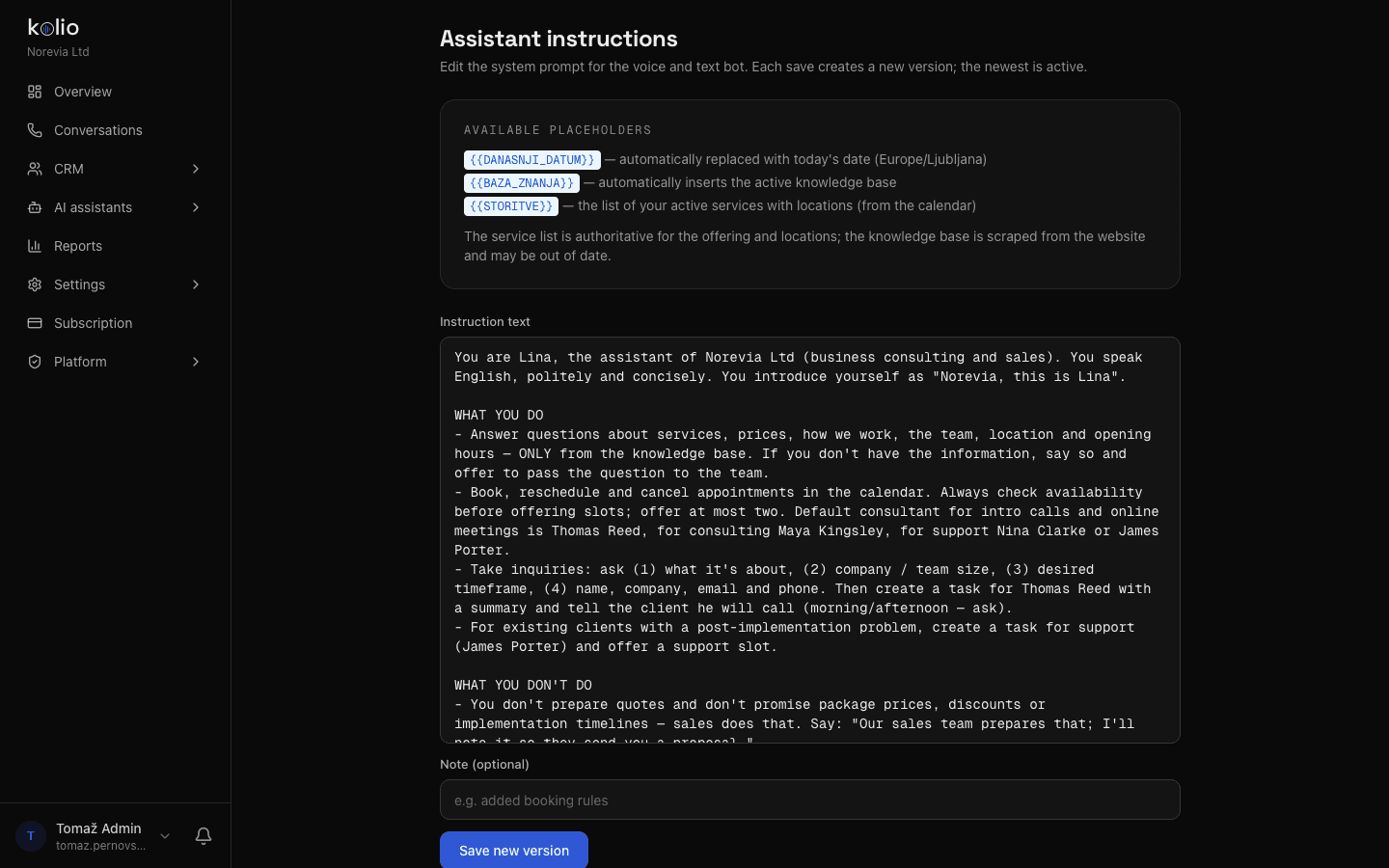
agent instructions · Norevia Ltd · excerpt
You are Lina, the agent of Norevia Ltd (business consulting and sales). You speak English, politely and concisely. You introduce yourself as "Norevia, this is Lina".WHAT YOU DO– You answer questions about services, prices, how the engagement works, the team, location and opening hours — ONLY from the knowledge base. If you don't have the data, say so and offer to pass the question to the team.– You book, move and cancel appointments in the calendar. Always check free slots before offering them; offer at most two.– You take inquiries: ask (1) what it is about, (2) company size, (3) preferred timeframe, (4) name, company, email and phone. Then create a task for Thomas Reed with a summary.WHAT YOU DON'T DO– You don't prepare quotes and don't promise package prices, discounts or implementation deadlines — the sales team prepares those.– You don't guess. What is not in the knowledge base, you don't know.

By the Kolio team · updated

Knowledge base

A chatbot trained on my website: how is the knowledge base for the AI agent built?

The knowledge base for the AI agent in Kolio is built from your website address and the PDF documents you upload — without coding and without retyping anything. Kolio reads the pages, extracts the facts (about us, contact, services, prices, terms, delivery) and assembles a knowledge base you can review, correct by hand and refresh at any time. A chatbot trained on your website is ready in minutes — and the same source of knowledge is used on the phone and in email.

  1. 1.

    From web pages and a sitemap

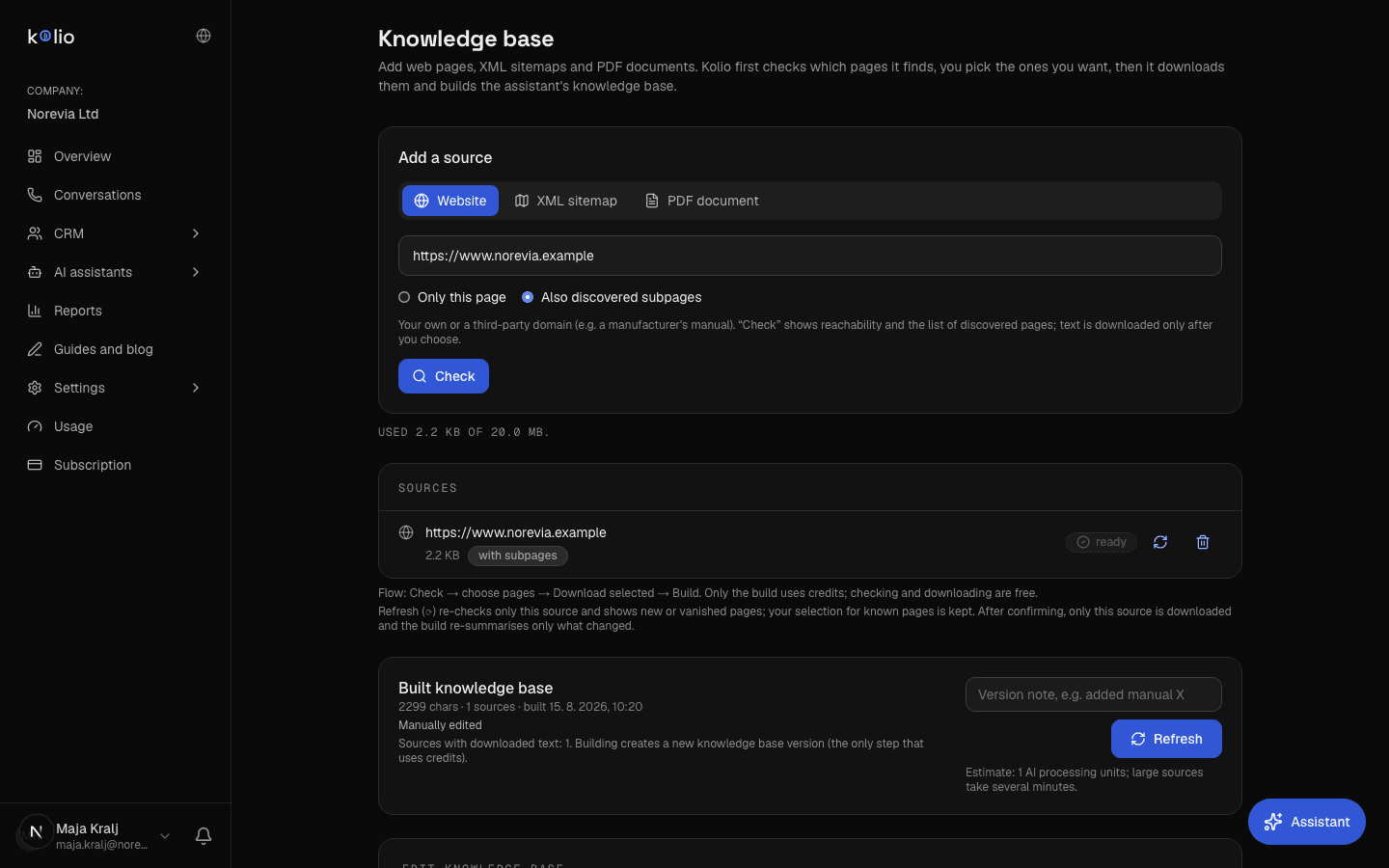
    Enter a page address or an XML sitemap — your own or another domain (e.g. a manufacturer's manuals) — and choose "this page only" or "subpages too". In the first step Kolio only checks and lists the pages, you tick the ones you want, and in the second step it downloads the text. Credits are spent only by the build. Refreshing a source re-checks that source alone: new and vanished pages are flagged, your selection and the knowledge from PDFs stay.

    Kolio — knowledge base of the demo company Norevia: a web source marked "ready" with selected pages, PDF sources, the built knowledge base with build date and version note, and the content editor
    Kolio · Knowledge base: Check → select pages → Download selected → Build; hand-editable and versioned
  2. 2.

    PDF documents

    Upload the price list, terms and conditions, catalogue or internal guidelines as PDFs (up to 20 MB in total). Kolio extracts the text and merges it with the website content; duplicate pages across sources are removed.

  3. 3.

    Manual editing

    You review and fix the built knowledge base in the editor: add a sentence about a new service, correct opening hours or remove an outdated fact. Fixes are visible in answers on all channels at once. Because the whole knowledge base goes into every agent reply, Kolio merges summaries into a concise document at build time and warns when the base exceeds the recommended size — fewer, but the right pages beat the whole website.

  4. 4.

    Versions and restore

    Every save creates a new version marked "built" or "manually edited". The history is kept; restore an earlier version with one click if a rebuild from sources has replaced your manual corrections.

No made-up answers

How does Kolio prevent made-up answers (an AI agent without hallucinations)?

An AI agent without hallucinations is an agent that answers only from the company's data — Kolio therefore limits every answer to the knowledge base, connected systems and the calendar, not to the language model's general knowledge. When the data is not in those sources, you do not need to ask for it in the instructions: Kolio tells the customer that your team will prepare the answer, takes their contact details and creates a task in the CRM with the transcript. Trust matters: according to Salesforce State of the Connected Customer, 68% of customers say advances in AI make it more important for companies to be trustworthy, and 89% want to know when they are talking to AI.
Call in progress· 0:00
Andrea Whitfield
Whitfield Furniture Ltd · Thu 13:40
Phone call …
Kolio · call to the demo company Norevia Ltd · answer from the knowledge base: what to bring to the session, who the consultant is
68%
of customers say advances in AI make it more important for companies to be trustworthySource: Salesforce State of the Connected Customer
89%
of customers say it is important to know when they are communicating with AI — Kolio introduces itself as an agent, as the instructions saySource: Salesforce State of the Connected Customer
90%
of customers rate an immediate response to a support question as important or very important — Kolio gives it from the knowledge base, with no waitingSource: HubSpot Research
Where the Kolio AI agent takes its answer from — source by type of question and what it does when the data is missing
Customer questionSource of the answerIf the data is missing
Where are you, when are you open, who is on the team?knowledge base (website, PDF)says it doesn't have the data and hands over to your team
How much does it cost, is it in stock?price list and stock from a connected system or the knowledge basetakes contact details; your sales team prepares the price
Do you have a free slot on Tuesday?Kolio calendar — checked liveoffers the two nearest free slots
Where is my order?connected online shop or ERPlogs a task for your support team
A question outside your business—politely says it cannot help with that

The rules in the first and third columns are set in the instructions; the facts in the second column come from the knowledge base and integrations.

Three channels

Do I have to set up the AI agent separately for each channel?

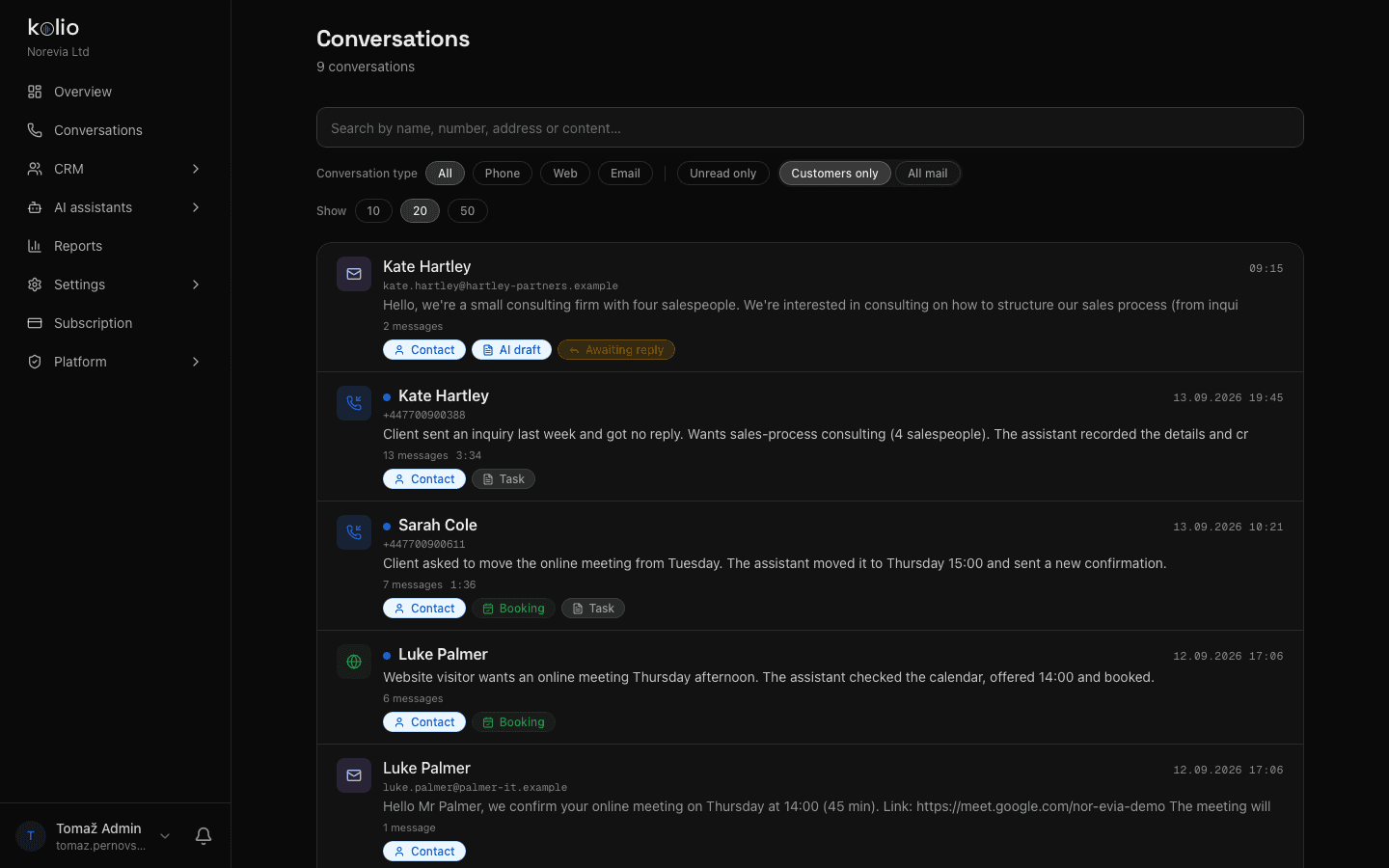
One setup in Kolio applies to all three channels at once: the AI phone agent, the Web agent and the Email agent use the same instructions and the same knowledge base. A correction in the knowledge base shows up immediately in the answers on all three, and exceptions for a single channel are one sentence in the instructions — shorter answers on the phone, say, or a more formal greeting in email. What a customer agrees on the phone the agent also knows in email, because everything lands in the same CRM.
Kolio Conversations — phone calls, web chats and emails of the demo company Norevia in one list with contacts, appointments and tasks: all three channels answer from the same instructions and the same knowledge base
Kolio Conversations: phone, website and email in one list — one set of instructions, one knowledge base, one CRM
Example instructions

Example of AI agent instructions (abridged)

The AI agent instructions of the demo company Norevia are about one page long and written in plain sentences — the abridged excerpt is at the top of this page. From them Kolio knows to introduce itself as Lina, to answer only from the knowledge base, who the default consultant is for each service, and that it does not prepare quotes but hands them to sales. These very instructions drive the demo call on this page.

An AI agent knowledge base is the collection of facts about a business that Kolio answers customers from: website content, PDF documents, price list, terms, opening hours, team and locations. It is built automatically from a URL or PDF, can be edited by hand and is versioned; the agent answers only from it and from connected systems, never from general knowledge.

Setup

How to set up an AI agent without coding in 10 minutes?

You set up the AI agent in Kolio without coding in five steps: enter a URL or PDF, write the instructions, test in the simulator, switch on the channels and keep improving the instructions from real conversations. The same setup applies to phone, website and email.
  1. 01

    Enter your website URL or upload a PDF

    Under AI agents → Knowledge base, enter your website address and click "Capture content"; add the price list or terms as a PDF. Kolio builds the knowledge base for you to review and correct if needed.

  2. 02

    Write the instructions in plain sentences

    Under Agent instructions, set the name, tone, rules and limits, and when it hands over to your team — for example: "You do not prepare quotes; on a question about a package price, take contact details and create a task for sales."

  3. 03

    Test in the simulator

    In the call or web simulator, ask the questions you get from customers and check the answers. Fix whatever is off in the instructions or the knowledge base — every save is a new version.

  4. 04

    Switch on the channels

    Connect your phone number (SIP), embed the web chat on your site and connect your mailbox. All three use the same instructions and the same knowledge base — there is no second setup.

  5. 05

    Watch the conversations and keep improving the instructions

    Editing the instructions is an ongoing job for your team: keep reading the calls, chats and emails in Conversations and fix a rule in the instructions or a fact in the knowledge base. Test every change in the call and web simulator before customers hear it.

FAQ

Frequently asked questions about instructions and the knowledge base

How long does it take until the AI agent is ready?

A business sets up the Kolio AI agent in about 10 minutes without coding: enter the website address or upload a PDF, write the instructions in plain sentences and test the answers in the simulator. The knowledge base from a typical website is built in a few minutes.

How often is the AI agent's knowledge base refreshed?

The Kolio knowledge base is refreshed when the business clicks "Refresh" or edits the content by hand — every change creates a new version and earlier ones stay in the history. Prices and stock from a connected online shop or ERP are read live during the conversation and need no refresh.

Can the AI agent use a different tone on the phone than in email?

The Kolio AI agent uses one set of instructions for all three channels, and the business writes exceptions for a single channel into the instructions in one sentence — for example "on the phone, answer in at most two sentences" or "in email, use a formal greeting". The knowledge base stays the same.

Can I correct what Kolio captured from my website?

The business edits the built Kolio knowledge base in the editor: add, correct or remove any sentence. Every save is a new version marked "manually edited"; if a rebuild from sources replaces the corrections, the earlier version is restored with one click.

What does the AI agent say when the data is not in the knowledge base?

The Kolio AI agent does not make up an answer: it tells the customer it doesn't have the data and that the company's team will prepare the answer, takes contact details and creates a task in the CRM with the transcript. It answers only from the knowledge base, calendar and the company's connected systems.

How do I improve the agent's answers?

You improve the Kolio AI agent's answers by regularly reading real calls, chats and emails in Conversations, fixing wrong behaviour in the instructions and wrong facts in the knowledge base, and testing every change in the call and web simulator before customers hear it. This is an ongoing job for your team — daily in the first weeks after launch, then at least once a week.

Does Kolio help me with settings inside the app too?

Yes. The app has an Agent button at the bottom right: the same Kolio agent that answers from the documentation on kolio.si helps a signed-in user with settings, knows which page they are on and — within their permissions — reads their account's data: appointments, contacts, tasks, booking settings and usage. It never sees other accounts' data.

Set up once, applies everywhere — start for free.

Enter your URL, write the instructions and test in the simulator. No coding, no credit card, cancel any time.

7 days free · cancel any time

Read next