Where it represents you · Phone

AI phone agent that answers every call.
On your existing number.

Kolio is an AI phone agent for businesses that connects to your existing phone number over SIP and answers every call 24/7 — no change of carrier. During the call it replies from your instructions and knowledge base, books an appointment, qualifies the inquiry and hands it to your team as a task with the transcript in the CRM. The quote comes from your sales team.

7 days free · no credit card · your number stays with your carrier

Call in progress· 0:00
Ben Gallagher
Gallagher Construction Ltd · Fri 11:15
Phone call …
Kolio · call to the demo company Norevia Ltd · Friday 11:15 · Lina answers the price question, books a consultation and hands the bundle price to sales

By the Kolio team · updated

01Your number

How does a phone agent work on your existing phone number?

A phone agent on your existing phone number works because Kolio takes over the number through a SIP trunk: in Settings → Telephony you enter your provider's SIP account (server, username, password) and the numbers to answer, and the configuration is pulled to the telephony bridge automatically. The number stays with your carrier, contracts and forwarding rules do not change; Kolio recognises the call by the dialled number and routes it to your agent. Your team calls back from the same number through the Softphone in the browser. Why speed matters: in a Harvard Business Review audit only 37% of companies responded to a lead within an hour and 23% never responded — an AI phone agent answers in the same call.
37%
of companies responded to a lead within an hour; 23% never responded (audit of 2,241 companies)Source: Harvard Business Review
82%
of buyers expect an immediate response when they have a sales or marketing questionSource: HubSpot Research
~40%
of appointments are booked outside working hours, between 5 pm and 9 am — when nobody is at the phoneSource: Zocdoc
02How it sounds

What does an AI answering service sound like: voice, languages, interruptions?

The AI answering service in Kolio runs as a natural conversation: the agent speaks with one of 12 multilingual voices (Soniox), listens in real time and lets the customer take the floor — if interrupted, it stops and answers the new question. Speech travels in telephone quality (G.711), the same as any other call to your number. You set the greeting, language and voice yourself; the conversation always stays within your instructions.
Kolio AI phone agent in Conversations: transcript of a phone call in which the agent Lina answers a buyer's price question from the price list, books an introductory consultation and hands the bundle-price question to sales as a task
Kolio Conversations: the call transcript as your team sees it — every agent reply has its source in the price list or knowledge base

Voice and greeting

Choose one of 12 voices (female and male) and write the greeting the agent answers with — for example "Norevia, good afternoon, this is Lina, your agent". The agent introduces itself with the name and company you define.

14 languages

The agent speaks English, Slovenian, German, Croatian, Serbian, Italian, Hungarian, French, Spanish, Portuguese, Dutch, Polish, Czech and Slovak. You set the language in the telephony settings.

Interruptions and silence

The customer can interrupt the agent mid-sentence (on by default, can be switched off). If the caller goes quiet, the agent checks after 8 seconds whether they are still there and ends the call after 30 seconds of silence. You set the thresholds.

03During the call

What does a virtual Phone agent do during the call?

The Kolio virtual Phone agent is an AI agent that answers questions during the call from the knowledge base and connected systems, books appointments on its own, qualifies the inquiry and writes it up for your sales team as a task, and reports order or repair status when the system is connected. What it does not know, it does not guess: it asks for contact details and hands the question to your team. It never issues quotes, discounts or orders — your sales team does.

Books the appointment itself

Checks free slots in the Calendar, books, emails the confirmation, and reschedules or cancels by phone. The only transaction it completes without your team — see Appointments, site visits, meetings.

Inquiry → task for sales

Asks what, how many, when and for whom, takes contact details and creates a task with a summary and transcript in CRM and tasks. In detail: Inquiry capture.
04Your team

What does the phone agent do when a call needs your team's decision?

The Kolio Phone agent does not resolve a complex call on its own: when the customer asks for a quote, a discount, an exception or someone from the team, the agent notes what the customer needs, takes contact details and a preferred time, and creates a call-back task in CRM and tasks. It tells the customer who will call and when. It does not transfer the live call — your team calls back from the Softphone or a phone, with the full transcript in front of them, and decides itself.
Call in progress· 0:00
Kate Hartley
Hartley & Partners · Mon 18:42
Phone call …
Kolio · call to the demo company Norevia Ltd · Monday 18:42 · Lina records the inquiry and arranges a call-back from the head of sales
What the Kolio AI phone agent does itself during a call and what it hands to your team as a task
Customer requestAI phone agent does itselfHands to your team
Question about price, duration, lead time, opening hoursanswers from the price list and knowledge base—
Appointment, site visit, meetingchecks the calendar, books, confirms by email—
Reschedule or cancel an appointmentmoves it to the next free slot or cancels—
Inquiry about a service or productqualifies (what, how many, when, for whom), takes contact detailstask for sales with summary and transcript
Quote, bundle price, discountexplains that sales prepares the quote, records the scopetask for sales
Order or repair statusreports from the connected system; without a connection it does not guesstask for support if the data is missing
Complaint, order changerecords what is wrong and takes contact detailstask for support
"I want to speak to someone from the team"records the reason and preferred time, says who will call backcall-back task; the call is not transferred
05Transcript and CRM

How are the call transcript and the CRM record stored?

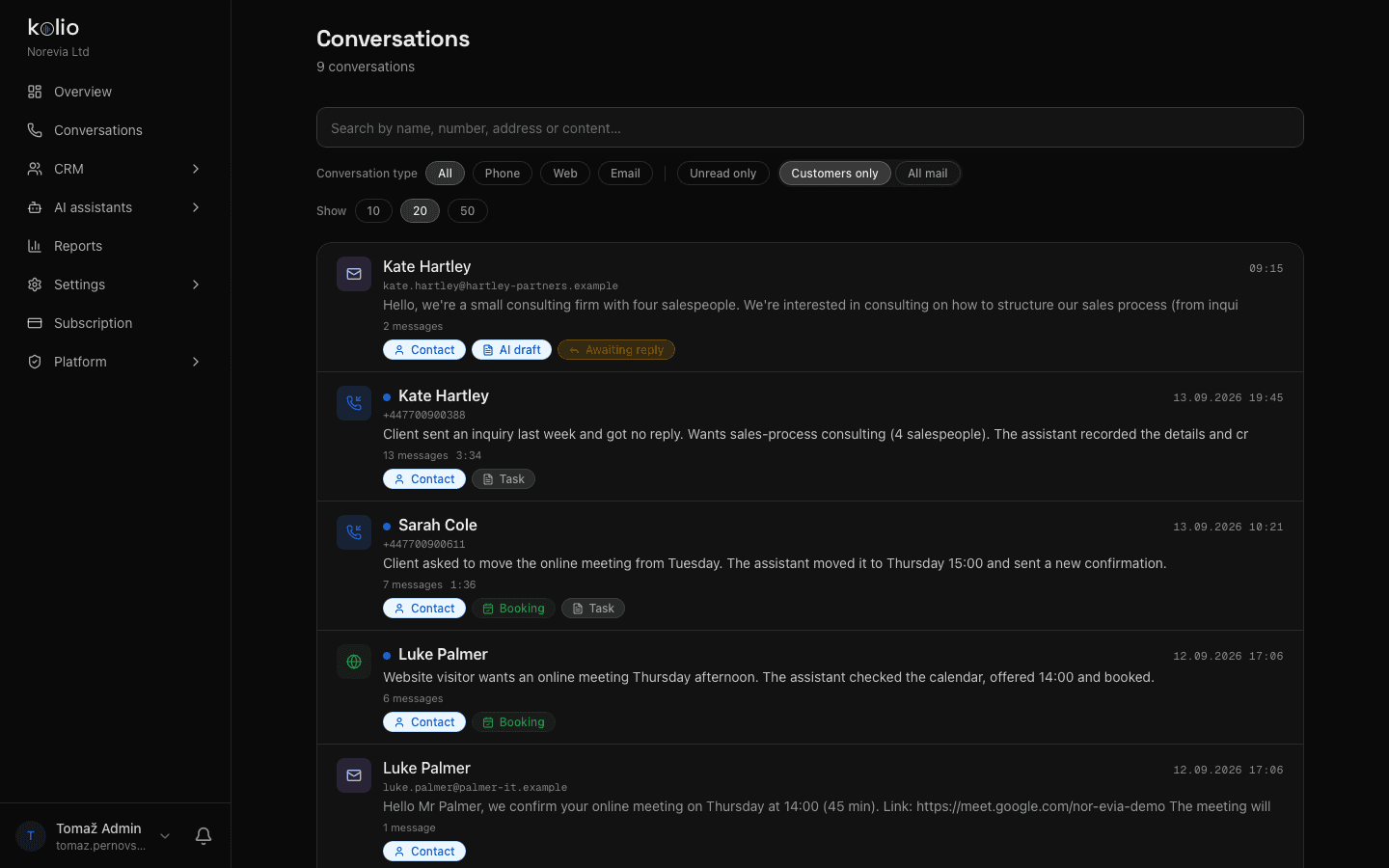
The call transcript in the CRM is created live: Kolio transcribes the caller and the agent during the call (Soniox) and adds a structured summary afterwards — service, interest, collected data, recommended next step. It recognises the caller by phone number and attaches the conversation to the existing contact; otherwise your team assigns it to a new contact with one click. Kolio stores the transcript and summary, not the audio recording. All calls, web chats and emails from the same customer sit on one contact in CRM and tasks; export and deletion of a customer's data are available under GDPR — see Security and GDPR.
Kolio Conversations: list of phone calls, web chats and emails with the demo company Norevia Ltd answered by the AI phone agent — each conversation with a transcript, summary and linked CRM contact
Kolio Conversations: calls, chats and email in one list — every call with a transcript, summary and contact

Live transcript

Every line has a timestamp and speaker (caller / agent). The transcript is text-searchable and attached to the task your team receives.

Summary after the call

Service, interest, collected data (name, contact, quantity, deadline) and the recommended action — so the head of sales knows what to do without reading the whole transcript.

Contact and history

On a repeat call the agent knows the customer: which appointment they have and what they asked last time. Your team sees the same history on the contact card.

06Legal

How do you tell customers they are talking to AI, and what about recording?

In Kolio the notice that the customer is talking to AI is part of the greeting you write yourself — for example "this is Lina, the virtual agent of Norevia". We recommend saying it in the first sentence: according to Salesforce, 72% of customers say it is important to know whether they are communicating with an AI agent, and the EU AI Act (Regulation (EU) 2024/1689, Article 50) requires providers to ensure people are informed when they interact directly with an AI system. Kolio does not store an audio recording — it keeps the call transcript and summary, which your team can export or delete. Recording and personal-data processing fall under your privacy policy; transcripts are deleted automatically after 365 days under the default retention.
72%
of customers say it is important to know whether they are communicating with an AI agentSource: Salesforce, State of the AI Connected Customer
Art. 50
of the EU AI Act: people must be informed that they are interacting with an AI system, unless this is obviousSource: Regulation (EU) 2024/1689, EUR-Lex

Greeting with disclosure

The greeting is your text. Suggested: company name, agent name and the word "virtual" or "AI" in the first sentence — the customer knows who they are talking to before they ask.

Transcript instead of recording

Kolio does not store audio; it keeps the transcript and summary. That is less sensitive than a recording but still personal data — include it in your privacy policy.

Export and deletion

Export or permanently delete a customer's data (conversations, contact, appointments, tasks) on request; automatic retention deletes old transcripts after 365 days.

Definition

AI phone agent is a software service that answers every call on a business's existing phone number 24/7, replies from the instructions and knowledge base, books an appointment or records an inquiry and hands it to the team as a task with the transcript. Kolio is an AI phone agent that connects to the number over SIP — no change of carrier; the quote comes from your sales team.

Setup

How do you connect the AI phone agent to your existing number in three steps?

You connect the AI phone agent to your existing number without a technician and without changing carrier: you need your provider's SIP details, entered in Settings → Telephony. The same instructions and knowledge base also apply to the website and email channels.
  1. 01

    Enter the SIP account and the numbers to answer

    In Settings → Telephony choose the provider (Zadarma, Twilio or generic SIP), enter the server, username and password, and the numbers Kolio should answer. The password is encrypted in the database; the registration status appears within minutes.

  2. 02

    Set the greeting, language and voice, add knowledge

    Write a greeting with the AI disclosure, choose the language and voice, switch interruptions on or off. In plain-sentence instructions you say what the agent may do itself and what it hands to the team; add your website and PDFs to the knowledge base.

  3. 03

    Test in the simulator and call

    Check the answers in the call simulator without a live number, then call your own number. Every call is immediately in Conversations with a transcript, appointments in the Calendar, tasks with your team.

FAQ

Frequently asked questions about the AI phone agent

Do I have to change carrier or phone number for the AI phone agent?

The Kolio AI phone agent needs no change of carrier or number: the number stays with your provider and Kolio connects to it through a SIP account (server, username, password) entered in Settings → Telephony. Zadarma and Twilio are preset; any other SIP provider, including national carriers, is added through the generic setting.

What happens when a customer needs your team's decision or wants to speak to someone from the team?

The Kolio AI phone agent notes what the customer needs, takes contact details and a preferred time, and creates a call-back task in the CRM; it tells the customer who will call and when. It does not transfer the live call — your team calls back with the full transcript in front of them and decides itself. Quotes, discounts and orders always come from your sales team.

Does the customer know they are talking to an AI phone agent?

The customer learns it from the greeting you write in Kolio, for example "this is Lina, the virtual agent of Norevia". Kolio recommends disclosure in the first sentence: according to Salesforce, 72% of customers say it is important to know whether they are communicating with an AI agent, and the EU AI Act (Article 50) requires that people are informed when interacting with an AI system.

How many calls can the AI phone agent take at the same time?

The Kolio AI phone agent runs every incoming call as a separate session, so several calls at once do not end in a busy tone or voicemail. The upper limit is the number of concurrent calls your provider allows on your SIP trunk; for predictably higher volumes a dedicated Kolio instance is available.

Does the AI phone agent speak German, Croatian or Slovenian too?

The Kolio AI phone agent speaks 14 languages: English, Slovenian, German, Croatian, Serbian, Italian, Hungarian, French, Spanish, Portuguese, Dutch, Polish, Czech and Slovak. You set the language and one of 12 voices in Settings → Telephony.

Does Kolio record calls?

Kolio does not store an audio recording of the call. A transcript is created during the call (who said what and when) and a structured summary afterwards; both sit on the contact in the CRM and your team can export or permanently delete them. Informing customers about data processing remains part of your privacy policy.

Phone agent for your number — start for free.

Enter the SIP account, write the greeting and call your own number. No credit card, no change of carrier.

7 days free · cancel any time
Read next