Unanswered calls
A call after 4 pm or during a meeting ends up on voicemail. Most customers don't leave a message — they call the next supplier on the list. Kolio takes the call and records the inquiry.
Kolio is an AI agent for businesses that captures leads by phone, on the web and by email 24/7 — after hours included. It asks the qualification questions your company defines, records the contact and creates a task for the salesperson in the CRM with a summary and the transcript of the conversation. Your sales team issues the quote or takes the order — the agent deliberately never closes either.
7 days free · no credit card · set up in minutes
By the Kolio team · updated
A call after 4 pm or during a meeting ends up on voicemail. Most customers don't leave a message — they call the next supplier on the list. Kolio takes the call and records the inquiry.
An inquiry sent on Friday evening gets a reply on Monday afternoon without an agent. By then the customer already has two quotes from elsewhere.
The form lands in a shared inbox where nobody owns it. A week later the customer calls to ask why no one got back to her — like Ms Hartley in the example above.
Lead qualification is the process in which the Kolio agent asks the customer five questions — what, how much, when, for whom and contact details — that your company defines in the instructions in plain sentences. The agent doesn't guess what the customer needs: it asks. The same questions apply by phone, in web chat and by email, and the answers go into the task summary in the CRM so the salesperson doesn't call back just to ask again.
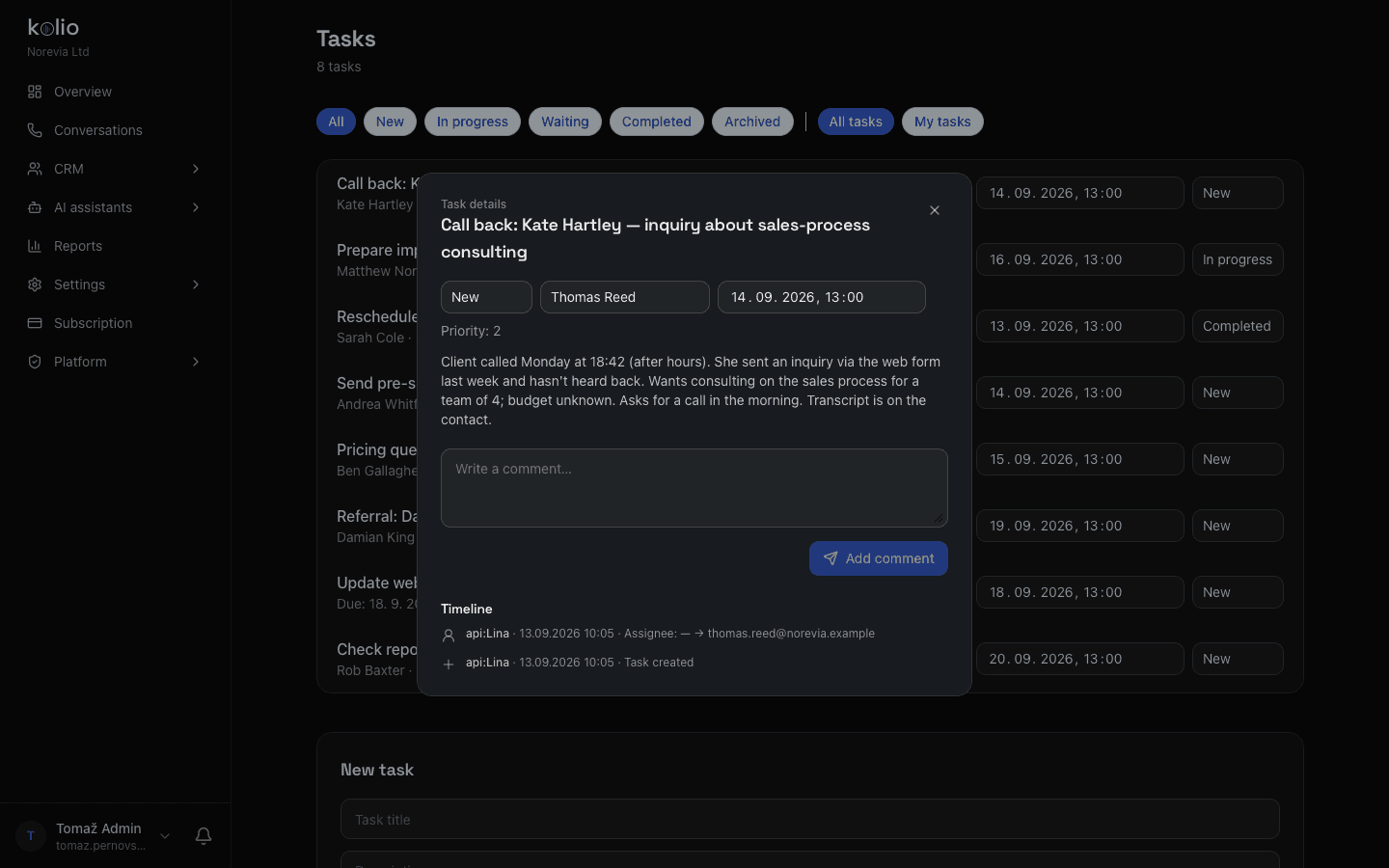
Client called Monday at 18:42 (after hours). She sent an inquiry via the web form last week and hasn't heard back. Wants consulting on the sales process for a team of 4; budget unknown. Asks for a call in the morning. Transcript is on the contact.
A task in Kolio has a title, assignee, priority and due date. The description holds a three-sentence summary; the full transcript is on the contact — one click away.
| Step | Who | When |
|---|---|---|
| Taking the inquiry by phone, web or email | Kolio AI agent | 24/7, immediately |
| Qualification questions: what, how much, when, for whom, contact | Kolio AI agent | during the conversation |
| Contact and task with summary and transcript in the CRM | Kolio AI agent | at the end of the conversation |
| Appointment for an intro call or site visit | Kolio AI agent | during the conversation, if the calendar is set up |
| Price, discount, payment terms | your sales team | on the call-back |
| Quote or order | your sales team | after reviewing the task |
| Confirming the deadline, scope and promises | your sales team | in the quote |
After hours. The agent takes the call on your number (Phone), asks what sales needs to know and says when sales will get back.
Contact saved, task created, salesperson notified — all in CRM and tasks. The transcript is on the contact.
The task is at the top of the list, with the summary. They call back — straight from the browser via the Softphone — and issue the quote.
23% of companies never responded to a web inquiry at all; only 37% responded within an hour (2,241 companies audited)
The AI agent answers immediately, evenings and weekends included. If the customer already exists in the CRM, it recognises them and picks up where things left off.
What, how much, when, for whom and contact details — exactly the questions you wrote in the instructions. It doesn't guess and doesn't promise prices.
A contact with details, a task with an assignee, priority, summary and a link to the transcript. The assignee is notified.
At the time the agent told the customer. Your sales team issues the quote or takes the order; in the meantime the agent has only booked an appointment, if the customer wanted one.
The Kolio AI agent answers calls, web chats and emails in the evening and at weekends too, asks the company's qualification questions, records the contact and creates a task for sales in the CRM. It tells the customer who from sales will call back and when, based on the working hours the company sets.
The Kolio AI agent introduces itself as the company's agent (for example "this is Lina, the agent") and, when asked directly, says it is an AI agent. How it introduces itself is defined by the company in the instructions.
The company sets the task assignee in Kolio's instructions: one default salesperson, or a salesperson by area or service. A task can be reassigned in the Kolio CRM at any time, and the timeline shows who took it over.
For an appointment it books, Kolio sends the customer an email confirmation if they gave an address. For an inquiry, it tells the customer who from sales will call and when; the written quote is prepared by the company's sales team.
The Kolio AI agent does not issue quotes: following the company's instructions, it hands the inquiry to your sales team as a task with the conversation transcript. It only books appointments on its own; the quote or order is issued by the company's sales team, who know the prices, discounts and lead times.
Write the qualification questions, set the assignee and try lead capture in the simulator. No credit card.
7 days free · cancel any time