Your own mailbox over IMAP/SMTP
Any mailbox at your host (info@, sales@): enter the IMAP and SMTP server, user and passwords, and Kolio verifies the connection. It fetches new messages every 5 minutes and replies through your SMTP.
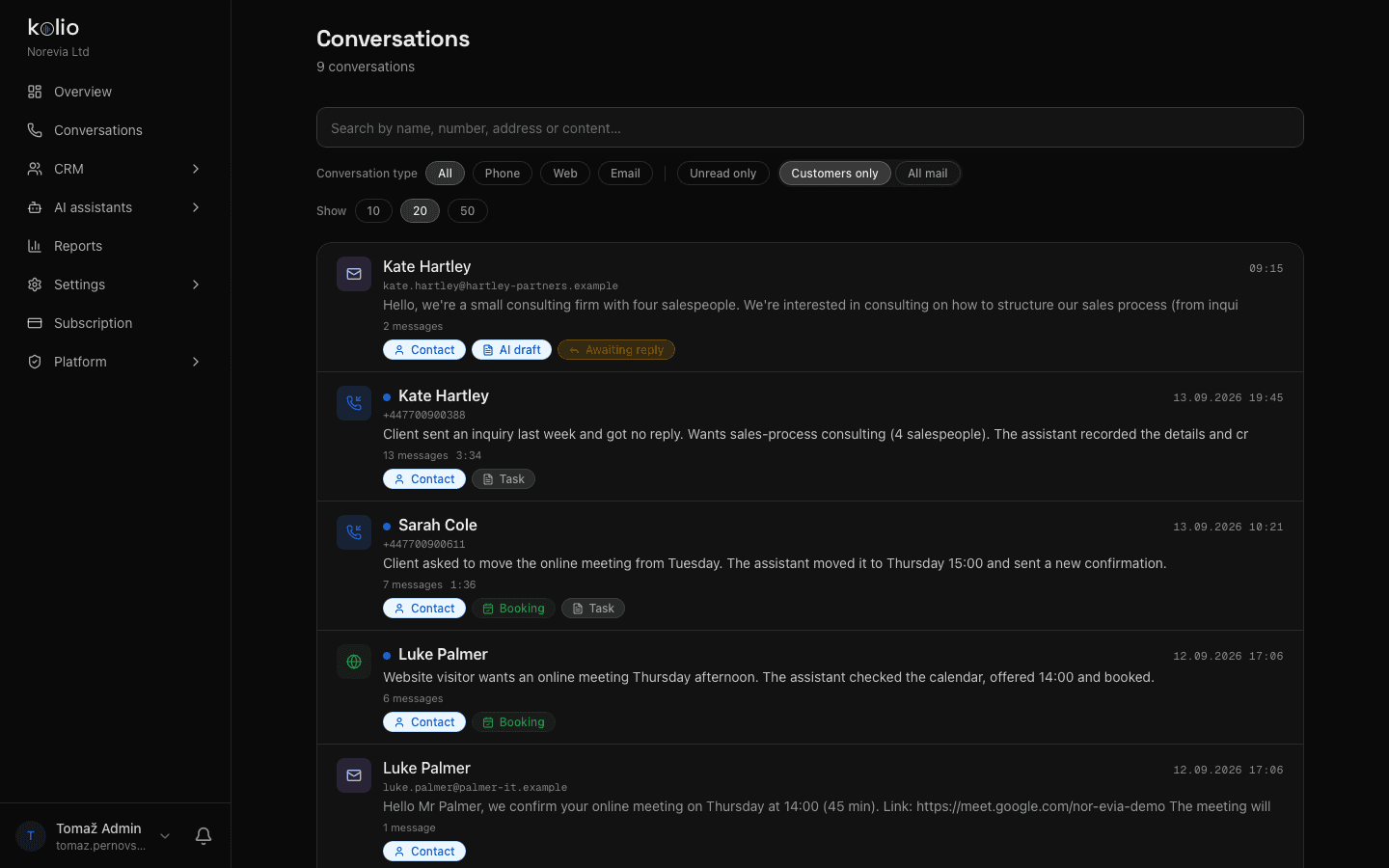
Kolio is an email agent for businesses: it connects to your existing mailbox (IMAP/SMTP or Gmail), reads new messages, separates customers from bulk mail and replies to customers from your company address — automatically, or as a draft your team reviews and sends. Same instructions and knowledge base as on the phone and in web chat; quotes stay with sales.
7 days free · no credit card · off by default, you switch it on
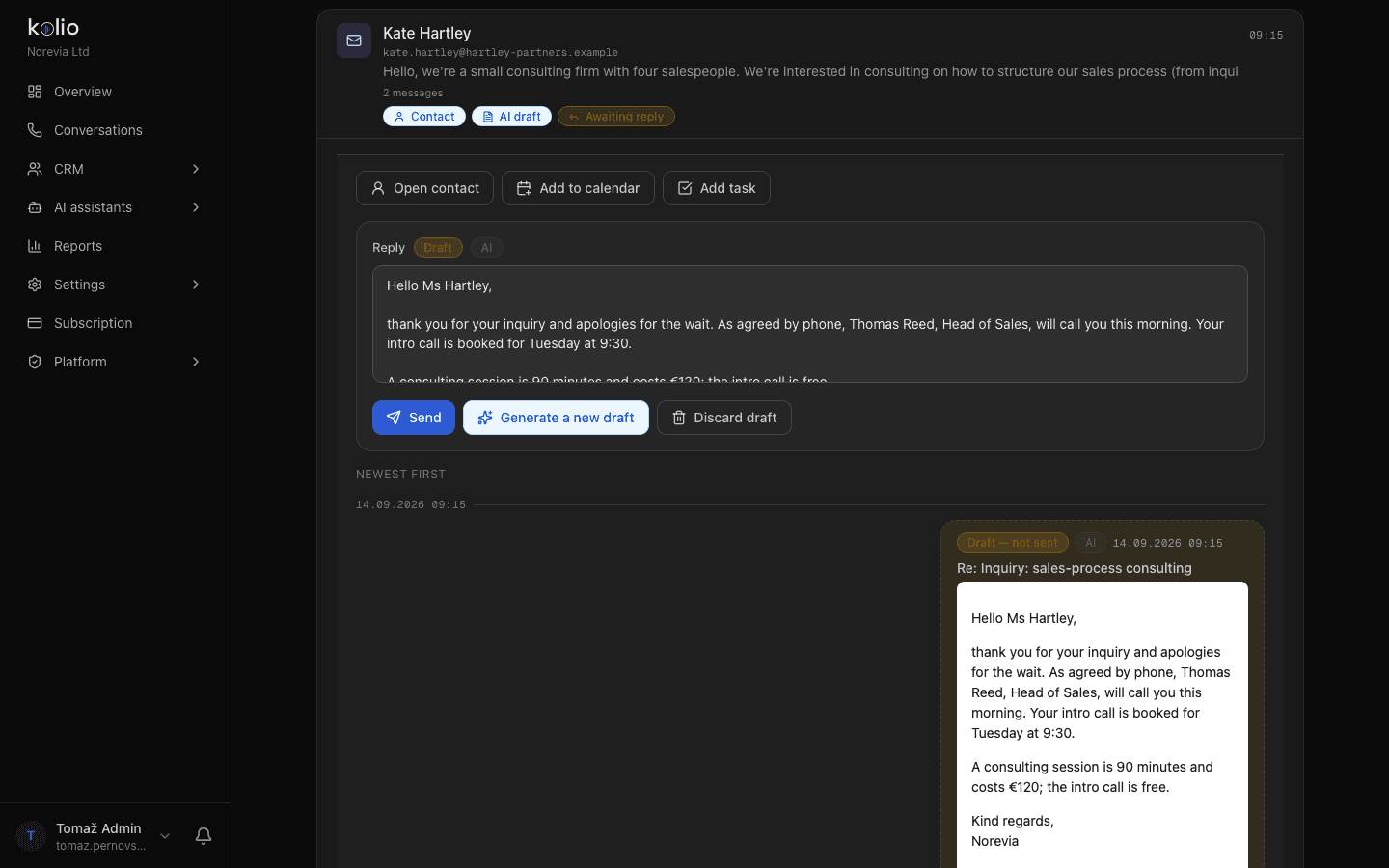
From: info@norevia.exampleTo: kate.hartley@hartley-partners.exampleSubject: Re: Inquiry: sales-process consultingStatus: draft — not sent · AIHello Ms Hartley,thank you for your inquiry and apologies for the wait. As agreed by phone, Thomas Reed, Head of Sales, will call you this morning. Your intro call is booked for Tuesday at 9:30.A consulting session is 90 minutes and costs €120; the intro call is free.Kind regards,NoreviaBy the Kolio team · updated
AI customer email replies in Kolio are a deliberate decision by the business, not a side effect of connecting a mailbox: the default mode is off, where Kolio only reads mail and stores it in the CRM. The recommended first step is draft — for every customer message the AI prepares a reply that sits in Conversations and waits for your team to send or discard it. Only when you are happy with the quality do you switch to automatic. Why it pays off: according to SuperOffice, 62% of businesses never reply to customer emails at all, and the average response time is over 12 hours.
Kolio reads mail and stores it with conversations in the CRM, but does not reply. Your team writes and sends as before — only in one place with calls and chats.
The AI prepares a reply that waits in Conversations with the buttons Send, Prepare a new draft and Discard draft. Until your team sends it, it goes nowhere.
The AI replies on its own, right at the next mailbox check. Every sent reply is marked as AI in the CRM and visible in the full thread with the customer.
| Mode | What the AI does | Who sends the reply | When to use it |
|---|---|---|---|
| Off ("Off" in settings, default) | Nothing. Kolio only reads the mail and stores it in the CRM next to conversations. | Your team, manually | When you only want all customer mail in one place with calls and chats — no AI. |
| Draft ("Test" in settings, recommended to start) | Prepares a draft reply to every customer message from your instructions and knowledge base; actions (appointment, task) are only proposed. | Your team — reviews, edits if needed, adds an attachment and clicks Send | The first weeks: you see how the AI would answer your real mail, where it errs and what the knowledge base lacks. |
| Automatic ("On" in settings) | Replies on its own, without review; actions (appointment, contact, task) run immediately. | The Kolio AI agent, from the company address | When drafts have gone weeks without edits — for frequent questions, appointments and first replies to inquiries. |
In every mode sending is limited to replies to customers; the AI never replies to bulk or system mail.
The Kolio Email agent does not introduce a new address: it connects to the mailbox your business already has and replies from it — the customer sees info@your-company.com, not a generic address. The reply carries an In-Reply-To reference to the customer's message, so the thread stays intact in their mail client; a copy of every exchange stays in the CRM. IMAP and SMTP passwords and the Google token are encrypted in the database, and Kolio never marks messages in your mailbox as read — it tracks its own progress, so everything in your mail client stays as it was.
Any mailbox at your host (info@, sales@): enter the IMAP and SMTP server, user and passwords, and Kolio verifies the connection. It fetches new messages every 5 minutes and replies through your SMTP.
Connect the mailbox with your Google account (OAuth), no password. Kolio reads the Inbox and sends from your Gmail address; the AI reply drafts are created in Kolio, in Conversations, not in Gmail's Drafts folder.
The rule is printed on the Settings → Email page, where both sections live — the IMAP/SMTP mailbox at the top, the Google connection below. The sender (name and address) is the same for AI replies and for messages your team writes itself.
Automatic replies to email inquiries in Kolio go only to people who actually wrote to your business. On receipt, Kolio flags a message as bulk if it carries the List-Unsubscribe or List-Id headers, Precedence: bulk or Auto-Submitted — newsletters, system notifications, out-of-office auto-replies. It treats system senders (mailer-daemon, no-reply, postmaster) and the mailbox's own addresses the same way. The AI does not reply to such messages and prepares no draft; in Conversations the default "Customers only" view hides them and "All mail" shows them. The decision is made on receipt, while the headers are still available — it cannot be computed retroactively.
A customer or prospect writing from their own address: an inquiry, a question about price or lead time, a request for an appointment, a reply to your message.
Newsletters and marketing mail, invoices and notifications from online services, bounce messages, out-of-office auto-replies, your own mail from the same mailbox.
Client called Monday at 18:42 (after hours). She sent an inquiry via the web form last week and hasn't heard back. Wants consulting on the sales process for a team of 4; budget unknown. Asks for a call in the morning. Transcript is on the contact.
The only way a contact is created from email. Existing messages from that address are linked to the new contact, and new ones land on it automatically.
Whatever the AI proposes in a draft (appointment, contact, task) runs only when your team clicks Send. A discarded draft leaves behind neither an appointment nor a task.
The Kolio Email agent is the same agent that represents your business on the phone and on your website: it uses the same instructions and knowledge base, the same list of services and the same tools — it checks free slots in the Calendar, recognises the customer in the CRM and reads from your connected systems. So by email it quotes the same price and the same lead time as on the phone; there is no double maintenance of instructions. Only the style differs: an email reply has a salutation, full paragraphs and the company signature (or the signature of the team member who sends the draft), while a phone reply has two short sentences. Details already known about the customer (name, phone, company from the CRM and signatures) are not asked for again.
Prices, services, lead times and terms from the same knowledge base. What it does not know, it does not guess — it writes that your team will answer, and the message stays in Conversations.
Free slots, booking, contact and task in the CRM — by email just like on the phone. It does not issue quotes or custom prices; those go to your sales team.
Salutation, clear paragraphs, up to about 600 words, company signature. The agent reads the last six messages of the thread so it answers in the context of the conversation.
A customer can attach an image (PNG, JPEG, WebP, GIF) or a PDF up to 10 MB to their email — Kolio stores the attachment with the message in Conversations and on the contact, and your team opens or downloads it. Every file is checked by content, not by name: the type is determined from the file itself, images are re-encoded (hidden metadata is dropped), a PDF with active content (scripts, embedded files) is rejected, as is every other file type. The AI sees only the attachment's name, type and size, never its content — so in the reply it confirms receipt ("thank you for the plan you sent") but does not claim to have read it. Your team, in turn, attaches its own files to the draft before sending, for example a quote as a PDF — up to 5 attachments and 20 MB per message.
An image or PDF up to 10 MB with the inbound message. It is stored in Kolio, available in Conversations and on the contact; download is allowed only to members of your team with the right permission.
Attach a quote, price list or image to the draft or to a new message; it goes out through your SMTP or Gmail together with the text. Automatic AI replies send no attachments.
PNG, JPEG, WebP, GIF and PDF are allowed; HTML, SVG, ZIP and office documents are rejected. When a contact is deleted (GDPR), its attachments are deleted too.
Enter the details of your own mailbox (IMAP and SMTP server, user, passwords) or click "Connect Google" for Gmail. Kolio verifies the connection and starts fetching new messages into Conversations; the passwords are encrypted in the database.
By email the agent answers from the same instructions and knowledge base as on the phone. Add what customers ask by email (delivery, payment, terms) and test the replies in the simulator.
In the "Email agent" card choose "Test" — the AI prepares a draft for every customer message, and your team sends it. The mode is off by default, so nobody gets an AI reply without your decision.
For a few weeks send, edit or discard the drafts; where the AI errs, extend the knowledge base. Once drafts need no edits, switch to "On" — you can switch back at any time.
Kolio reads new messages in the Inbox of the connected mailbox (IMAP INBOX or the Gmail Inbox label) from the moment of connection onwards and stores them in the CRM next to conversations. It does not mark messages as read and does not move or delete them; IMAP and SMTP passwords and the Google token are encrypted in the database. Mail sent from your own mail client is not fetched.
Kolio flags them as bulk mail on receipt, based on the List-Unsubscribe, List-Id, Precedence: bulk and Auto-Submitted headers and on system senders (no-reply, mailer-daemon, postmaster). The AI does not reply to such messages and prepares no draft; in Conversations the "Customers only" view hides them and "All mail" shows them.
The "Test" mode in Kolio is the recommended first step: the AI prepares a draft for every customer message, which waits in Conversations for your team to send, edit or discard. Actions the AI proposes in the draft (appointment, task) run only when the reply is sent. You can switch to automatic replies at any time, and back again.
The Kolio Email agent replies from the connected company mailbox — through your SMTP server or your Gmail account — with the sender name and address you set yourself. The customer sees your address, and replies land in your mailbox and in Kolio Conversations. If both IMAP/SMTP and Gmail are set up, IMAP/SMTP takes precedence.
Kolio checks the connected mailbox every 5 minutes and processes new messages at every check. In automatic mode the reply goes out in the same run; in draft mode the draft is ready in Conversations within minutes and waits for your team's review.
A customer can attach an image (PNG, JPEG, WebP, GIF) or a PDF up to 10 MB; Kolio checks the attachment by content, stores it with the message and shows it to your team in Conversations. The AI sees only the attachment's name and size, not its content. Your team attaches up to 5 files (20 MB in total) to a draft or a new message, for example a quote as a PDF; automatic AI replies send no attachments.
Kolio does not create contacts from inbound email automatically: the message is stored and attached to an existing contact with the same address, otherwise it stays without a contact until your team clicks "Create contact". That keeps suppliers, newsletters and system notifications out of the CRM, and attributing a person remains your team's decision.
Connect your mailbox, choose "Test" and watch for a few weeks how the AI would answer your real mail. No credit card.
7 days free · cancel any time