What is the knowledge base?
AI agent knowledge base is, in Kolio, one structured document of facts about your company that the AI builds from your sources or that you write by hand, and that the agent receives in every conversation.
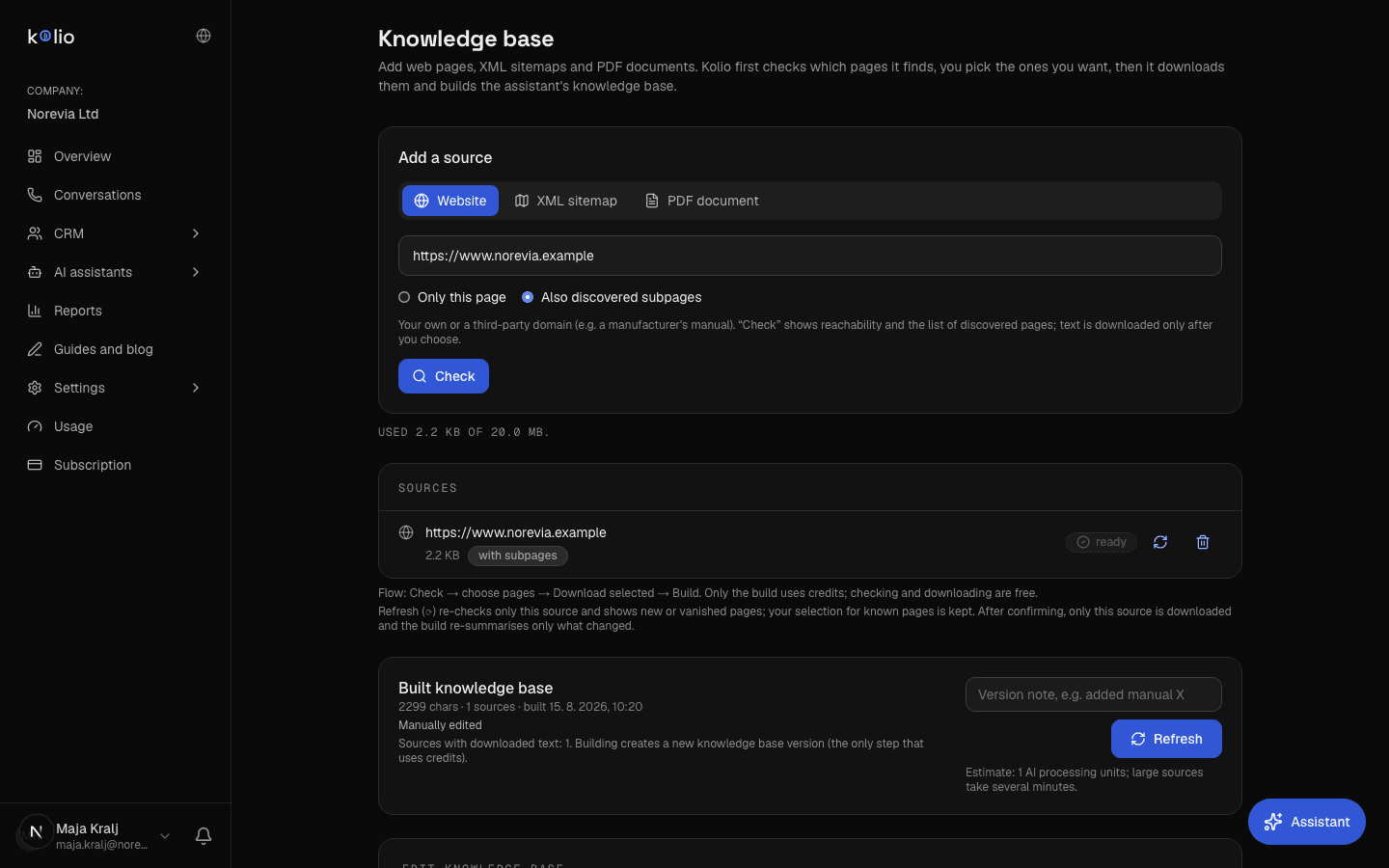
You manage the knowledge base in AI agents → Knowledge base (permission baza-znanja). The page has three parts: adding sources (Website, PDF document), the Built knowledge base card with the Build or Refresh button, and the editor with Version history. The newest version is always the active one.
How the knowledge base reaches the agent
In every conversation the active version of the knowledge base is inserted into the agent instructions at the {{BAZA_ZNANJA}} placeholder (see AI agent instructions). In addition the agent has the search_knowledge_base tool, which finds up to 3 most relevant sections of the base (at most 1,500 characters) for the customer's question by keyword scoring — no vector embeddings, because it is one document per account.
Which sources are available?
A knowledge base in Kolio is made from three kinds of sources: a captured website, a PDF document and text written or corrected by hand. Website and PDF are "sources" in the Sources list from which the AI builds the base; manual text goes directly into the editor.
| Source | How to add it | Status |
|---|---|---|
| Website | Website → enter the URL (your own or a third-party domain, e.g. a manufacturer's manual) → choose Only this page or Discovered subpages too → Check → tick pages → Download selected | works; you can add several sources |
| XML sitemap | XML sitemap → enter the sitemap address (e.g. https://company.com/sitemap.xml; sitemap indexes and .xml.gz are supported) → Check → tick pages → Download selected | Kolio lists every URL from the sitemap without following links; it downloads only the ticked ones and the source list shows “X of Y found selected” |
| PDF document | PDF document → Upload PDF (max 20 MB, PDF with a text layer only) | Kolio checks the file, extracts its text and adds the source to the list; a scanned PDF without text is rejected |
| Manual text | Edit knowledge base → write or correct Content → Save new version | works; without any sources you can write the whole base by hand |
The total size of all sources is limited to 20 MB; the line "Used … of 20 MB" below the source list shows the usage.
How does Kolio capture a website?
Kolio does not crawl a website blindly: it first reads the sitemap, then ranks the candidates by usefulness for customer conversations and captures at most 15 pages with at most 12,000 characters of text per page. Pages with facts take priority over the catalogue, while foreign-language versions and shopping flows are skipped.
- The sitemap comes first. Kolio looks for the sitemap in
robots.txt(theSitemap:line), at/sitemap.xmland/sitemap_index.xml; it reads at most 5 sitemap files and scores at most 5,000 URLs. When there is no sitemap, candidates come from links discovered during the visit (BFS). - Ranking by usefulness. Every URL gets a score: matches of fact patterns (about, contact, shipping, payment, returns and refunds, warranty, terms, FAQ, opening hours, services, pricing, locations, inquiry) earn a large bonus, top-level pages (
/contact) a flat bonus, deep subpages and query parameters a penalty. The entry URL is always first. - Skipping useless pages. Cart, checkout, login, search, categories and tags, individual products (
/product/…), yearly blog archives, authors and system paths (/wp-json,/feed) are not captured; the same goes for paths with a language prefix (/en/,/de/,/hr/…), because for the agent they are duplicate content in another language. - The 15-page limit. When the site is larger, the source label says "first 15 pages" and a Fetched pages list appears under the source. The capture fails with an error if the page has fewer than 50 characters of usable text.
How do you build the knowledge base?
Building the knowledge base in Kolio turns all sources with text into one structured document: the AI extracts the facts useful for customer conversations (offering, procedures, terms, opening hours, locations, contact, FAQ) and drops navigation, buttons, cookie notices and marketing copy. The result is saved as a new version with origin AI-generated.
Add a source
In the Website section enter the address of the site (for example
AI agents → Knowledge base → Websitehttps://www.your-company.com) and click Fetch content. The source first appears as pending and, after the capture, with a page-count badge; on failure the cause is shown under the source.Check the fetched pages
Expand Fetched pages under the source. If an important subpage is missing, add it as a separate source; if several sources refer to the same site, the Overlapping sources warning appears.
Build the base
In the Built knowledge base card click Build (Refresh when a base already exists). The build takes from a few seconds to about a minute depending on the number of sources (every 4 sources are one model call). On failure Build failed is shown with the cause.
AI agents → Knowledge base → Built knowledge base → BuildReview and correct
Read the built content in the editor. Correct missing or wrong data and save with Save new version (origin manually edited). The meta line shows the number of characters, the number of sources and the build date.
Test in the simulator
In AI agents → Call simulator ask about a price, opening hours and a location. The answers must come from the base; for a question without an answer the agent must offer handover to your team.
AI agents → Call simulator
What happens to duplicate pages during the build
Before sending anything to the AI, Kolio removes pages that repeat across sources — by URL, or for older records by a content signature (the first 2,000 characters). It keeps the first occurrence; a source left without pages drops out. The number of sources after this step determines the price of the build, and the number of unique pages is recorded with the version.
The build runs in batches: 4 sources per model call, at most 16,000 characters of text per source; if several partial summaries result, a second call merges them into one document. All calls of one build are one group in the Usage overview.
How do you edit the base and restore an older version?
Every change to the knowledge base in Kolio is a new version: a build creates a version with origin AI-generated, saving in the editor a manually edited version, and a restore writes the old content as a new version. The history is never deleted and never overwritten.
| Action | Where | What results |
|---|---|---|
| Build / refresh | Built knowledge base → Build / Refresh | new AI-generated version; supersedes manual edits (the old version stays in history) |
| Manual correction | Edit knowledge base → Content + Version note → Save new version | new manually edited version; at least 20 and at most 200,000 characters |
| Discard unsaved changes | Discard changes | the editor returns to the active version, nothing is saved |
| Restore | Version history → Restore on the chosen version | new manually edited version with the note "Obnovljena verzija z dne …" (Slovenian for "restored version from …"); the history is kept |
The history shows the last 10 versions with date, origin, note, character count and the email of the person who saved them.
How does a build count against credits?
Building the knowledge base in Kolio costs 50 credits per every started 10 sources (after duplicate pages are removed) and is charged once per build, regardless of the number of model calls in it. Capturing a website, manual editing and restoring a version consume no credits.
| Sources in the build | Credits per build | Example: included plan credits |
|---|---|---|
| 1–10 | 50 | Trial: 250 credits → up to 5 builds if there is no other usage |
| 11–20 | 100 | Starter: 2,500 credits per month |
| 21–30 | 150 | Growth: 10,000 credits per month |
Included plan credits are from Kolio's pricing; the full usage overview is in Usage and billing.
When credits are used up, a build is not possible and the button returns an error with the code quota_credits; in the meantime the agent runs in limited mode (it only takes messages). Buy additional credits or wait for the next billing period — see Subscription.
Limits and what happens when you exceed them
The knowledge base limits in Kolio are defined in code and identical in all plans: 20 MB total source size, 15 pages per website source, 12,000 characters per page during capture, 16,000 characters per source during the build and 200,000 characters of manually edited content. The number of sources itself is not limited.
| Limit | Value | What happens when exceeded |
|---|---|---|
| Total source size | 20 MB (UTF-8 text) | a new source is rejected with an error about the 20 MB total limit; delete redundant sources |
| Single PDF | 20 MB | an oversized file is rejected in the browser; the PDF size counts towards the total source limit and the plan's storage |
| Pages per website source | 15 most useful | remaining pages are not captured; the source label says "first 15 pages" |
| Text per captured page | 12,000 characters | longer text is cut off |
| Text per source during the build | 16,000 characters per source, 4 sources per model call | the tail of the source does not reach the AI; split long sources into several sources (subpages) |
| Manually edited content | 20 to 200,000 characters | saving is rejected with a notice that the content is too short or too long |
| search_knowledge_base tool response | 3 sections, 1,500 characters | the agent gets only the most relevant sections; the whole base is in the prompt anyway |
Common problems and how to solve them
Most knowledge base problems come from the sources: a site without a sitemap, the wrong subpages captured or facts that are not on the website at all. Below are the most common cases and the solution in Kolio.
- "No usable text found on the page." The site renders content only with JavaScript or blocks automated visits. Enter the text manually in the editor or add a subpage that returns the content as HTML.
- The wrong pages were captured (blog, products). Add exactly the subpages you want as separate sources (
/contact,/pricing,/terms) and remove the entry source with the site root. - "Build failed: no sources with text." No source has at least 50 characters of captured text. Check the status of the sources and fix the capture errors.
- The agent claims a branch does not exist. Locations and the offering live in Settings → Services; the service list takes precedence over the knowledge base. Add the service with its location, not just text in the base.
- The agent quotes an outdated price. The knowledge base is a snapshot at build time. After a change on the website, capture the source again (delete and add) and click Refresh, or correct the price by hand and save a new version.
- Manual corrections disappeared. A refresh from sources created a new version. In Version history find the manually edited version and click Restore, then carry the new data into it.