Integrations · E-commerce

AI support for Shopify, WooCommerce and Magento.
"Where is my order?" Kolio looks in your store.

Kolio is AI support for online stores on Shopify, WooCommerce, Magento or a custom platform: it identifies the customer by order number, email or phone, reads the order and shipment status from your store via MCP and answers by phone, web chat or email. Returns become a task for your team in the CRM; it never refunds money.

Free for 7 days · no credit card · MCP integrations are included from the Growth plan

Web chatKolio
Customer

Hi, I still haven't received order 1042. Where is it?

Lina · agent

Let me check. Which email address was the order placed with?

Customer

maya.cross@example.com

Kolio checks the store · MCPtool: order status · policy: read-only
Lina · agent

Order 1042 for this email was handed to the courier on Thursday; delivery is expected today by 14:00. Shall I email you the tracking number?

RecordConversation with transcript on the contact Maya Cross · no task — the customer got the answer straight away
Kolio · example from the demo store · the customer asks about an order, Kolio reads it from the store via MCP and answers — no guessing

Prepared by the Kolio team · updated

01Order

How does the where-is-my-order integration work: Kolio reads the order from your store via MCP?

The where-is-my-order integration in Kolio means that Kolio connects to your online store as an MCP (Model Context Protocol) client and, during the conversation, calls the store's tool that returns the order and shipment status. In Settings → MCP sources you enter the address of your store's MCP server, test the connection and enable only the tools the agent may use — for example "order status" and "shipment tracking". Every answer to the customer therefore comes from data the store returned at that moment; if the store does not respond, Kolio tells the customer and hands the question to your support team as a task — it neither guesses nor retries the call. Customers accept this: according to Zendesk CX Trends 2025, 67% of consumers are willing to leave order tracking to an AI agent.

What it reads from the store

Order status, courier hand-over date, expected delivery and tracking number; for pre-purchase questions, stock per variant and delivery time — only through the tools you enable.

Read-only until you decide otherwise

The integration policy defaults to read-only: only tools the store marks as read-only get through. The list of enabled tools is empty when you connect — you enable each one yourself.

Time limits and response

During a call Kolio waits at most 4 seconds for the store, in chat and email 10 seconds. If there is no answer, it tells the customer the status is unconfirmed and creates a task for your team.

67%
of consumers are willing to leave tasks such as order tracking to an AI agentSource: Zendesk CX Trends 2025
90%
of customers with a support question expect an immediate response — within ten minutes or lessSource: HubSpot Research
45%
of consumers would rather use an AI agent when there is a clear path to the company's team — in Kolio, that path is a task in the CRMSource: Salesforce, State of the AI Connected Customer 2024
02Identification

How does Kolio identify the customer — and what does it never see?

Kolio gives the order status only to the customer the order belongs to, so it identifies them first: it asks for the order number, email or phone number the order was placed with and passes exactly that value to the store's tool — the store returns the order only on a match. On the phone Kolio records the caller's number with the conversation and links it to the contact in the CRM; by email it recognises the sender address. When your instructions say so, it asks for one more detail before answering, such as the delivery postcode. Kolio never sees payment data: it does not ask for card numbers, you do not enable tools that expose them, and every tool result is cleaned and truncated before it reaches the model. What is stored and how is described on Security & GDPR.
What the customer learns from Kolio, from which data, and who confirms it
What the customer learnsFrom which dataWho confirms
Order status (received, being prepared, shipped)the store's tool via MCP, at the moment of the questionnobody — Kolio answers from the data
Where the shipment is and expected deliverytracking number and courier from the storenobody — Kolio answers from the data
Whether a product or variant is in stockstock from the store via MCP or the catalogue in the knowledge basenobody — Kolio answers from the data
Return conditions, deadlines, shipping costsknowledge base (website, PDF, manual entry)nobody — Kolio answers from the data
Approved return or refundrequest logged as a task with the transcriptyour support team in the CRM
Address, quantity change or cancellationrequest logged as a taskyour support team; writing to the store only with the "allow changes" policy
Complaint about a damaged shipmentdescription and contact in the taskyour support team
Discount, custom price, volume quotequantity, deadline and contact in the taskyour sales team
03Before purchase

Before purchase: stock, variants, delivery — where does Kolio get the answer?

Before purchase Kolio answers about stock, variants and delivery from two sources: live from the store when it offers a stock tool via MCP, otherwise from the catalogue and rules in the knowledge base, where you upload your website, price list or PDF. It says whether a variant is in stock, offers the closest alternative (another colour or size) and quotes the delivery time and shipping costs as written. It never guesses a restock date: if it is neither in the store nor in the knowledge base, it says so and hands the question to your team. It sets no discounts or custom prices — it records quantity, deadline and contact for your sales team as an inquiry. For a store without an integration this is the simpler path: price list and stock from a file, without live data.
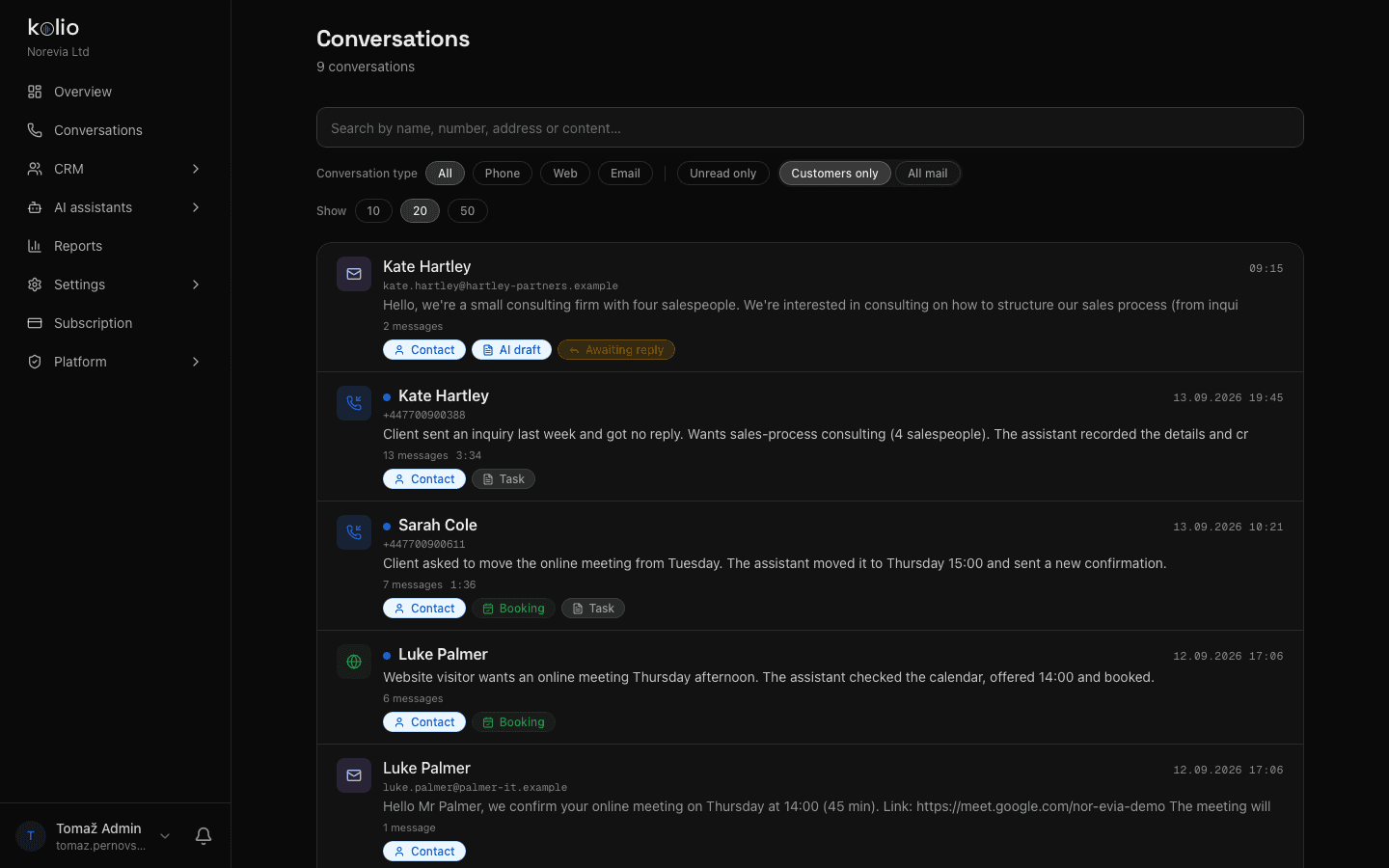
Kolio Conversations: list of phone calls, web chats and emails of the demo store Norevia with transcript, summary and contact — the same overview an online store gets for stock and order questions
Kolio Conversations: call, chat and email in one list — your team sees what Kolio answered and from which data

Live stock or catalogue

With a stock tool in the store it answers from the current level; without one, from the catalogue in the knowledge base that you keep up to date.

Variants and compatibility

Compares sizes, colours and models from product attributes; it advises on the choice but never sets custom prices.

Delivery and shipping

Quotes delivery time, costs and couriers exactly as written in the store or in your shipping rules — no guessing.

04Your team

Returns and order changes: what does the AI for e-commerce orders hand to your team?

The AI for e-commerce orders in Kolio does not process returns, changes or complaints itself — it prepares them for your team: it explains the conditions from the knowledge base, records the order number, what should change or why the item is being returned, takes the contact and creates a task with the conversation transcript in CRM & tasks. It tells the customer who will get back to them and when. Writing to the store — changing an address, cancelling a line — becomes possible only after you switch the integration policy to "allow changes" and explicitly enable the tool; even then the agent asks the customer to confirm before writing. Kolio never refunds money.
Task createdapi:Lina

Call back: Kate Hartley — inquiry about sales-process consulting

AssigneeTRThomas Reed· Head of Sales
ContactKate Hartley · Hartley & Partners
PriorityHighDuetoday

Client called Monday at 18:42 (after hours). She sent an inquiry via the web form last week and hasn't heard back. Wants consulting on the sales process for a team of 4; budget unknown. Asks for a call in the morning. Transcript is on the contact.

Timeline
  1. api:Lina · Mon 18:46
    Task created from a phone conversation
  2. api:Lina · Mon 18:46
    Assignee: Thomas Reed · priority: high
Kolio · task from the demo company Norevia · a return request is created the same way: title, assignee, priority, due date and transcript

Logs and hands over

A return, complaint or change request is a task for your support team with the order number, reason, contact and transcript.

States the conditions, doesn't decide

Return window, costs and procedure come from the knowledge base; approval, credit notes and refunds are your team's decision.

Writes only with your permission

A change in the store goes through only with the "allow changes" policy, an enabled tool and the customer's confirmation — for writes Kolio waits up to 12 seconds and never retries.

Platforms

Shopify, WooCommerce, Magento, custom store: how does the integration for AI support work?

The AI support integration for a Shopify, WooCommerce or Magento store runs through an MCP server for your store — Kolio has no platform-specific plugins; it talks to every system through the same standard. When an MCP server for your platform already exists (from the vendor or the community), you enter its address and credential; when it does not, we build one at onboarding as a thin layer over your store's API — as part of a dedicated Kolio or a consultation. The technical details (policy, allowlist, time limits, safeguards) are on How we integrate (MCP, API). Without an integration Kolio works from the knowledge base: it answers about products, conditions and delivery, but never guesses order status.

Shopify

Integration through an MCP server for your Shopify store: enter the address and credential, test the connection, enable the order and stock tools. Whether a server already exists, we check at the consultation.

WooCommerce

A WordPress store connects the same way — through an MCP server that reads orders and stock from your WooCommerce. Built at onboarding if your installation does not have one yet.

Magento and custom stores

For Magento AI support and custom stores we build the MCP server at onboarding over the store's API. Kolio then uses the same tools and the same rules as with any other integration.

Three ways Kolio gets to your online store's data
MethodWhat Kolio can doWhen it makes sense
Existing MCP serverreads orders, shipments and stock live; writes only with permissionthe platform or community already offers one — enter the address and credential
Custom MCP server built at onboardingsame as above, with tools tailored to youMagento, custom store, special requirements — dedicated Kolio or consultation
No integration: knowledge baseproducts, conditions, delivery from your site, price list and PDFsdoes not know order status — hands the question to your team as a task
Definition

AI support for an online store is an agent that answers a store's customers by phone, chat and email about their order, shipment, stock and conditions from the store's data — not from memory. Kolio reads that data through an MCP integration at the moment of the question, identifies the customer first, and hands returns and changes to your team as a task.

Integration steps

How do you connect your online store to Kolio in three steps?

You connect your store to Kolio in the settings, without touching the store itself: you need the MCP server address and a credential; the rest is choosing tools. MCP integrations are available from the Growth plan (enabled during the 7-day trial). The same instructions and knowledge base apply to phone, web and email.
  1. 02

    Test the connection and enable tools

    Click "Test connection" — Kolio reads the store's tool list and shows for each whether it reads or changes data. Enable only what the agent needs: order status, shipment tracking, stock.

  2. 03

    Complete the instructions and test

    In the instructions describe how the agent should identify the customer and what it hands to the team; add return and shipping conditions to the knowledge base. Then ask "where is my order" in the simulator and check the answer before switching on the channels.

FAQ

Frequently asked questions about AI support for online stores

Does Kolio support Shopify or WooCommerce directly, with no extra work?

Kolio has no platform-specific plugins: it connects to Shopify, WooCommerce, Magento or a custom store as an MCP client through an MCP server for your store. When such a server already exists you enter its address; when it does not, we build one at onboarding as part of a dedicated Kolio or a consultation.

Does Kolio see payment data or card numbers?

Kolio never sees payment data and never asks for it: it reads only what the store's tools return once the company explicitly enables them — order status, shipment, stock — and every tool result is cleaned and truncated to 600 characters before it reaches the model. A refund is always your team's decision and action.

How does Kolio know it is talking to the right customer?

Kolio identifies the customer by the order number, email or phone number the order was placed with and passes that value to the store's tool, which returns the order only on a match. If the company's instructions say so, it asks for one more detail before answering, such as the delivery postcode; without a match it reveals nothing and hands the question to the team.

What if we run several online stores?

In Kolio you can connect several MCP servers, each with its own policy and its own set of enabled tools; the agent can use at most 15 external tools at once, so with several stores enable only those it really needs. Separate companies with separate teams are separate accounts in Kolio.

Can Kolio change or cancel an order on its own?

By default Kolio does not change orders: the integration policy is read-only, and it logs changes and cancellations as a task for your support team. Writing to the store becomes possible only when the company switches the policy to "allow changes" and explicitly enables the tool; even then the agent asks the customer to confirm before writing.

What happens if the store does not respond during a call?

If the store does not answer within 4 seconds during a call (10 seconds in chat and email), Kolio tells the customer it cannot confirm the status right now and creates a task for your team; it does not retry the call. After several consecutive outages the integration is paused for 5 minutes and the agent answers from the knowledge base.

Does Kolio work without a store integration?

Kolio also works without an integration: from the knowledge base (website, price list, PDF) it answers about products, return conditions, delivery and shipping costs, but it does not know the status of an individual order and never guesses it — it logs the question and hands it to your team as a task. Web chat, phone and email work from day one.

AI support for your online store — start for free.

Upload your conditions and catalogue to the knowledge base, connect the store via MCP and ask the agent "where is my order". No credit card.

Free for 7 days · cancel any time · MCP integrations from the Growth plan
Read next