Sales · Answer customers instantly

AI sales agent that answers customer questions.
Instantly, from your data.

Kolio is an AI sales agent for businesses that answers customer questions about price, availability and delivery time automatically, 24/7 — from the price list and inventory and the knowledge base your company connects or uploads. If it doesn't have the answer, it doesn't guess: it asks for contact details and hands the inquiry to your sales team as a task in the CRM. It never sets discounts or individual prices — your sales team issues the quote.

7 days free · no credit card · set up in minutes

01 · The agent itself

Answers instantly, from your data

  • List price, stock and delivery time — from the price list, shop or ERP
  • Differences between products, packages and terms — from the knowledge base
  • An appointment for a viewing or consultation — booked in the Calendar

02 · Handed to your sales team

Anything that needs a decision goes to your sales team

  • A discount, an individual price or a quote
  • An order, a payment or a promise that isn’t in your data
  • A question with no answer in the data — as a task with the transcript in the CRM

By the Kolio team · updated

Before the purchase

Answer customer questions automatically before purchase: price, stock, delivery

The Kolio AI agent answers the four questions customers ask most often before they buy: price, stock, delivery time and the differences between products.

It answers instantly, by phone, in web chat and by email — at 9 pm or on a Sunday. Speed matters: according to HubSpot Research, 82% of consumers rate an immediate response to a sales question as important or very important.
Call in progress· 0:00
Ben Gallagher
Gallagher Construction Ltd · Fri 11:15
Phone call …
Kolio · call to the demo company Norevia Ltd · a question about price and a package deal

"How much is it?"

Kolio reads the list price, unit price, VAT and shipping costs from your price list. It doesn't round and it doesn't estimate.

"Is it in stock?"

Kolio checks stock levels in your connected online shop or ERP and says what's there — in stock, made to order or sold out.

"When will I get it?"

Kolio gives the delivery time and shipping options from your terms or product data; if an item is made to order, it says so clearly.

"What's the difference between …?"

Kolio explains the differences between products or packages from the descriptions in your catalogue and knowledge base — dimensions, materials, what's included.

82%
of consumers rate an immediate response to a sales or marketing question as important or very importantSource: HubSpot Research
24/7
Kolio answers by phone, on the website and by email — three channels, one setup
3 sources
price list and catalogue, stock from the online shop or ERP, knowledge base — Kolio answers from nothing else
Sources of answers

Where does the AI sales agent get the answer?

An AI sales agent is an agent that answers only from the company's own data — Kolio draws on three sources your company connects or uploads: the price list and catalogue, stock from your online shop or ERP, and the knowledge base.

It doesn't guess — every answer can be checked in the conversation record in the CRM.
01

Price list and catalogue

Upload your price list as a PDF or spreadsheet, or let Kolio read your website. Prices, descriptions and terms become part of the knowledge base; refresh it with one click when something changes.
03

Knowledge base

The knowledge base covers everything that isn't in the price list: shipping, returns, warranty, installation, opening hours. It is built from your website or a PDF, editable by hand and versioned — restore an earlier version any time. More: Instructions and knowledge base.
When there is no answer

What does the AI agent do when it doesn't know the answer?

When the information isn't in the price list, inventory or knowledge base, the Kolio AI agent doesn't invent an answer.

It tells the customer that sales will prepare the answer, asks for a name and contact details and records the inquiry in the CRM as a task with the conversation transcript. Your salesperson is notified and calls back — straight from the browser via the Softphone. A fast call-back pays off: in a Harvard Business Review study of 1.25 million leads, firms that contacted the customer within an hour were nearly 7 times as likely to qualify the lead as those that waited even an hour longer.
Customer's question
Data available
Answers instantly — with the price, stock or delivery time from your data
No data
Asks for contact details and creates a task for sales with the transcript
Recorded in CRM and tasks
Boundaries

What may the AI agent do, and what may it not?

The Kolio AI agent closes appointments on its own; discounts, individual prices and quotes go to your sales team.
It doesn't replace your sales team — it takes the routine questions off it so more time is left for selling: according to Salesforce's State of Sales, reps spend just 28% of their time actually selling. You set the boundaries in the instructions, in plain sentences.
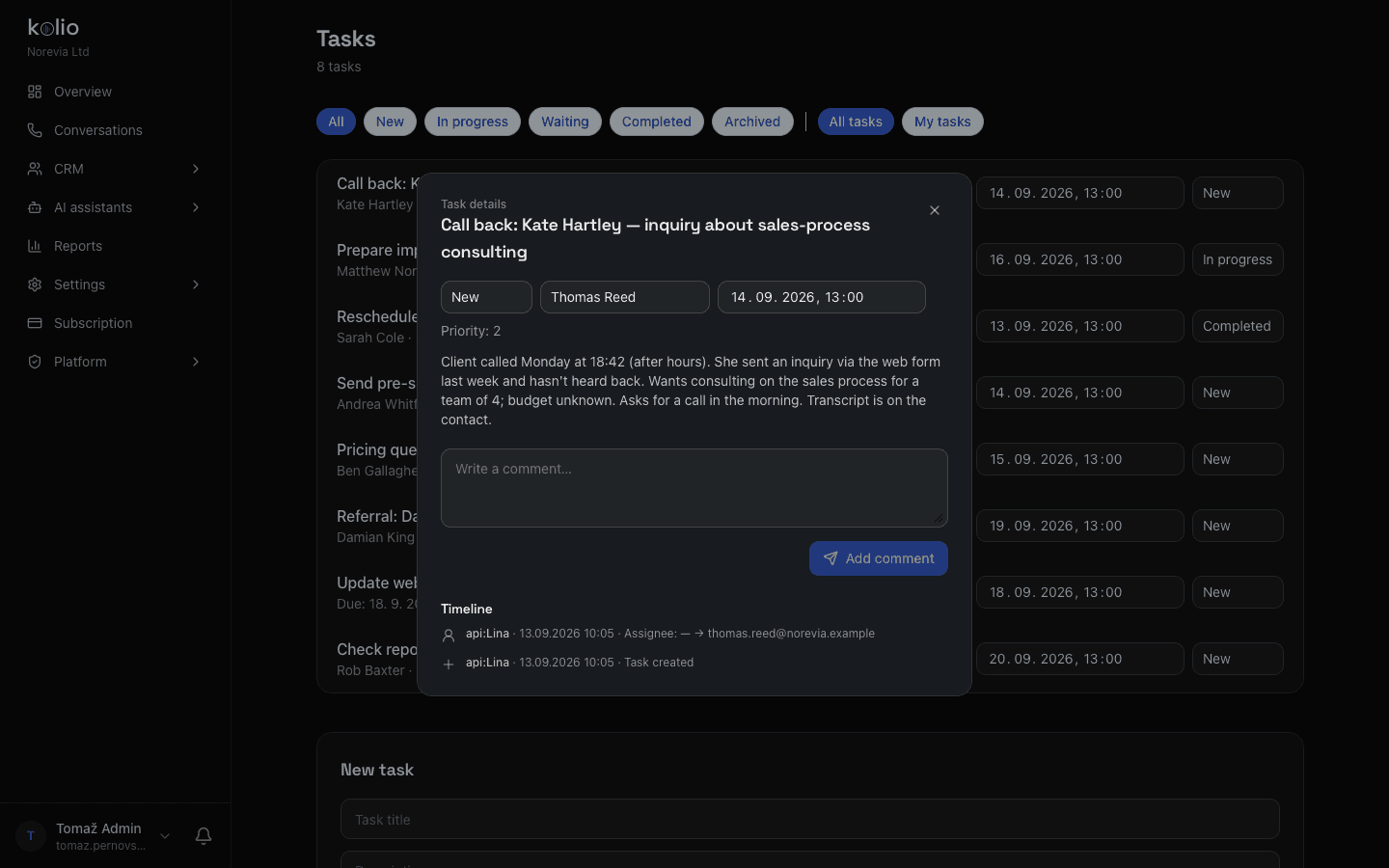
Kolio CRM — sales task created by the AI agent after a package-price question: inquiry summary, customer contact details and call transcript
Kolio CRM: anything the agent may not close itself reaches your sales team as a task with the transcript

Kolio may

  • State the list price, stock and delivery time from your data
  • Explain the differences between products, packages and terms
  • Book an appointment for a viewing, consultation or intro call in the Calendar
  • Record an inquiry in the CRM and hand it to a salesperson as a task

Kolio may not

  • Set discounts or individual prices — sales prepares those
  • Issue quotes, take orders or confirm payments
  • Promise deadlines or features that aren't written in your data
  • Make up an answer when the data isn't there
Example conversation

Example: answering a price question automatically

In a demo call to Norevia Ltd, Kolio gives the customer the list price for consulting from the price list (€120 for 90 minutes) and hands the question about a package price for three sessions to sales as a task in the CRM.
Meanwhile it books the customer a free intro call in the Calendar. The salesperson has the task and the transcript before the customer has even decided — an automatic answer to the inquiry, without promises the agent may not make.
Kolio AI agent answering a customer's price question in Conversations and handing package pricing to sales as a task — call transcript screenshot
Kolio Conversations: price from the price list, package price → your sales team, intro call booked
Services and prices of the demo company Norevia Ltd that Kolio answers from in the example above
ServiceDurationPriceWhat Kolio does
Intro call30 minfreestates the price and books the appointment itself
Consulting90 min€120states the price and books the appointment itself
Online meeting45 min€60states the price and books the appointment itself
Support60 min€80states the price and books the appointment itself
Implementation4 hby quotetakes contact details; your sales team issues the quote

Prices from the demo company's price list; Kolio never sets package or individual prices — it hands them to your sales team.

Firms that contacted the customer within an hour of the inquiry were nearly 7 times as likely to qualify the lead as those that waited even an hour longer — a study of 1.25 million leads.

Setup

How do you set up automatic answers for customers in three steps?

Automatic answers for customers are set up in Kolio without coding, in three steps: upload the price list, write the instructions and test in the simulator. One setup applies to phone, website and email at the same time.
  1. 01

    Upload your price list or connect your shop

    In Kolio's Knowledge base, enter your website address or upload a PDF price list; for live stock, connect your online shop or ERP under Connections.

  2. 02

    Write the instructions for the agent

    In plain sentences, set the tone, what it may say and when it hands over to sales — for example: "Don't give discounts; for package price questions, take contact details and create a task for sales."

  3. 03

    Test the answers and switch the agent on

    Ask the simulator the questions you get from customers, adjust the instructions if needed and switch the agent on for your phone number, website or mailbox.

FAQ

FAQ about AI answers for customers

Can an AI sales agent answer customer questions about price on its own?

The Kolio AI agent gives customers the list price, VAT and shipping costs from the company's price list, but it does not set individual or package prices. For such a question it takes the customer's contact details and creates a task for the company's sales team, who prepare the price and call the customer.

What does the AI agent do when it doesn't know the answer?

When the information isn't in the price list, inventory or knowledge base, the Kolio AI agent doesn't invent an answer. It tells the customer that sales will prepare the answer, asks for a name and contact details and records the inquiry in the CRM as a task with the conversation transcript.

What does Kolio do if the price in the ERP differs from the website?

When an ERP or online shop is connected to Kolio, the live data from the connection takes precedence over the knowledge base text. Without a connection, the last uploaded version of the price list applies, which the company refreshes with one click when prices change.

Does the AI agent know what's in stock in the physical store?

The Kolio AI agent knows the physical store's stock if the company's connected system (an ERP or an online shop with multiple warehouses) tracks it. Without a connection it doesn't guess: it tells the customer that sales will check and creates a task in the CRM.

How much does an AI agent that answers customers 24/7 cost?

Kolio can be tried free for 7 days with no credit card; subscriptions then start at €49 per month. One subscription covers answers to customers by phone, on the website and by email, 24/7.

AI pre-sales support 24/7 — let Kolio answer your customers.

Upload your price list, write the instructions and try it in the simulator. No credit card.

7 days free · cancel any time
Read next