Price list, stock, catalogue
Kolio gives the public price, availability and variants from an uploaded price list (PDF or web page) or live from your store or ERP over MCP; individual prices and discounts are handed to your sales team.
Kolio is an AI agent connected to your ERP, online store, service system or calendar: it reads the price, stock, order status and free slot from your system over MCP, not from memory. By default it only reads; you allow changes yourself, tool by tool. Anything beyond its permissions is handed to your team as a task in the CRM.
Free for 7 days · no credit card · read-only by default
Prepared by the Kolio team · updated
An AI agent connected to your online store or ERP answers from the value that holds in your system at the moment of the question — not from text it learned once. The price may have changed, the product sold out this morning, the order was handed to the courier at 9:12: none of that is in the instructions, all of it is in your system. During the conversation Kolio therefore calls a tool of your system, reads the answer and says it; if it gets no data, it doesn't hide that — it tells the customer the status is unconfirmed and creates a task for your team. The same applies on the phone, on the website and by email, from the same instructions and knowledge base.
Kolio's AI agent integrations cover six kinds of systems: price list and stock, online store, service and work orders, ERP and CRM, calendar and bookings, and the shared MCP and API path. Each has its own page — what the agent reads, what it may do on its own and how you set the connection up.
Kolio gives the public price, availability and variants from an uploaded price list (PDF or web page) or live from your store or ERP over MCP; individual prices and discounts are handed to your sales team.
Kolio recognises the customer by order number, email or phone and tells them the order and shipment status from your store through its MCP server; a return or change is recorded as a task.
Kolio reads the work-order status — received, in progress, waiting for a part, done — from your service system and tells the customer when the item is ready for pickup.
Kolio reads the lead time, confirmed installation date or open items from your ERP or CRM and tells them to a customer it has identified first; it never discloses amounts without your permission.
Kolio books appointments in the built-in calendar, which works right after sign-up; it uses an external booking system when that system offers free-slot and booking tools over MCP.
Kolio is also a source: the REST Integrations API v1, MCP server and webhooks give your systems appointments, contacts and tasks in both directions — with an API key and the scope you define.
An AI agent that checks data is read-only in Kolio by default: you add every external source with the "Read only" policy, under which the agent sees only the tools the server explicitly marks as read-only. Writing — a booking in your system, an order change — requires two decisions from you: the "Allow changing data" policy and enabling exactly that tool on the list; newly discovered tools are never enabled on their own. Safeguards you cannot switch off: https:// addresses only with protection against reaching your internal network, a call time limit (4 s in a phone call, up to 12 s for writing on the web), a circuit breaker that pulls a server for five minutes after three consecutive failures, and result sanitising — the agent treats results as data, never as instructions. With the Email agent in test mode, a member of your team confirms every proposed action before the reply is sent. What is stored and how is described on the Security and GDPR page.
For every system Kolio separates three things: what it reads and says, what it may do on its own, and what your team confirms. The table applies under the default read-only policy; with the "Allow changing data" policy you can move individual actions from the third column to the agent — tool by tool.
| System | What it reads and says | What it does on its own | Who confirms |
|---|---|---|---|
| Price list and stock | public price, availability, variant | answers the customer; records a question about volume or individual pricing | your sales team issues the quote |
| Online store | order status, shipment, planned delivery | tells the status to an identified customer; records a return or change as a task | your team changes the order |
| Service and work orders | work-order status, expected date, pickup | tells the status; agrees a pickup slot in the built-in calendar | the technician confirms the repair price |
| ERP and CRM | lead time, installation date, open items | says what is allowed; never discloses amounts without permission | your team writes to the ERP — or the agent, if you allow it |
| Calendar and bookings | free slots, existing bookings | books, moves or cancels an appointment in the built-in calendar | nobody — an appointment is the only action without a financial consequence |
| MCP and API (Kolio as a source) | your system reads Kolio's appointments, contacts and tasks | sends a webhook on an event: booking, contact, call, task | the owner or admin sets the API key scope |
A time without an offset is read as Europe/Ljubljana in Kolio's API and MCP. In the audit trail every integration action is labelled api:<key name>.
Integration is, in Kolio, a data source the agent can call during a conversation: the MCP server of your system (store, ERP, service, bookings) or an uploaded knowledge base. Every integration has a policy — read-only by default — and a list of enabled tools; what is not on the list, the agent does not see.
Kolio connects to any system that offers an MCP server over the Streamable HTTP transport of the Model Context Protocol specification — either your vendor provides it, or we build it for your ERP, store or service software during onboarding. Kolio has no built-in connectors for individual brands (Shopify, WooCommerce, Pantheon, Minimax …): the path to them is an MCP server and the tools it exposes. For price and stock without live data, the shortest path is the knowledge base, where you upload the price list.
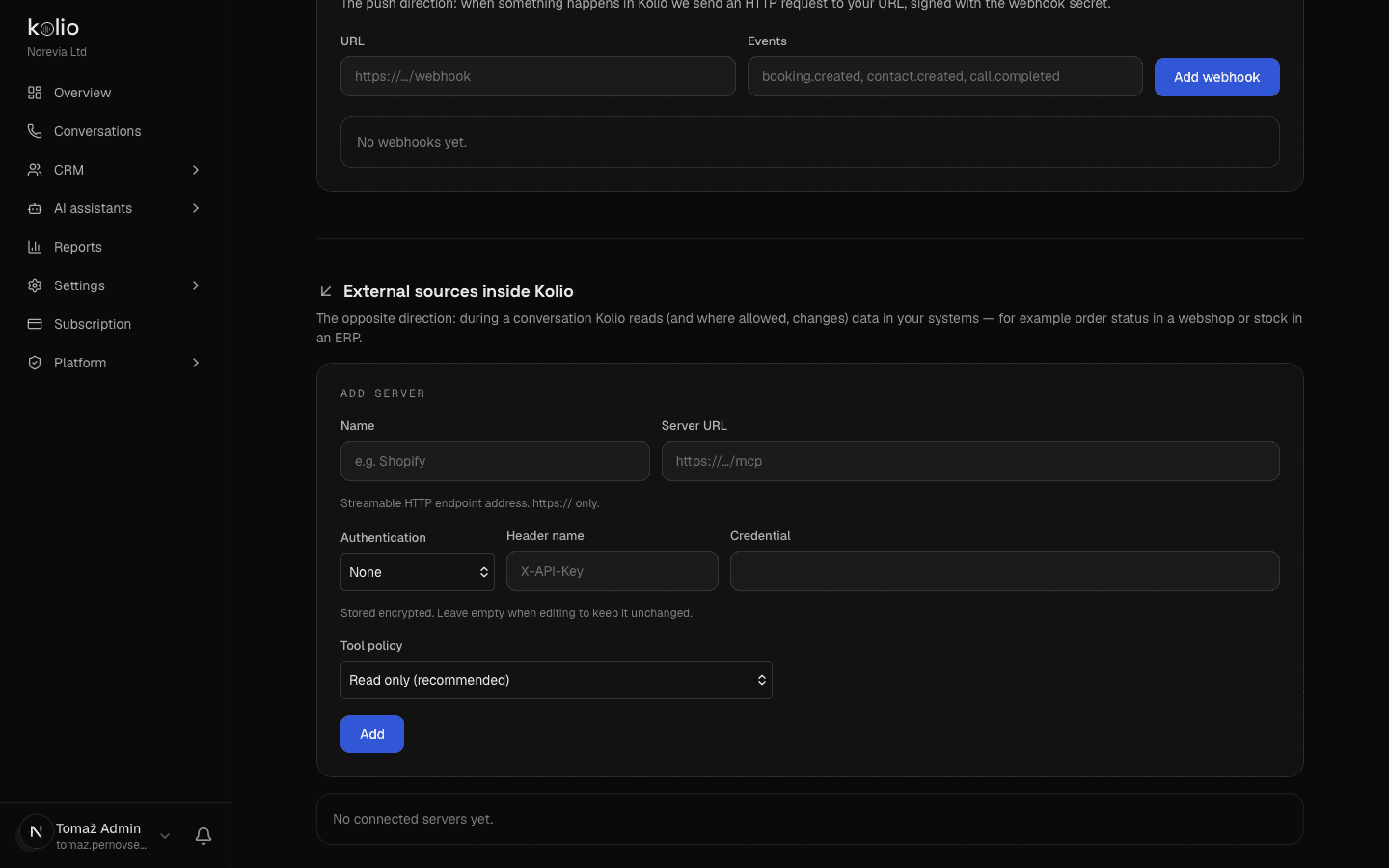
Enter the https:// address and credential, pick a policy, refresh and enable the tools. All in Settings → MCP sources and integrations, no programming.
For your own ERP, store or service software we build a server that exposes only the agreed tools. Part of dedicated Kolio or a standalone consultation.
Kolio's REST API v1 and MCP server with an API key: appointments, contacts and tasks in both directions, webhooks on events. Details on the MCP and API page.
For price and stock without live data, upload the price list to the knowledge base (PDF or web page). For live data you need an MCP server for your system — from the vendor or built to order during onboarding.
In Settings → MCP sources and integrations enter the https:// address, authentication (Bearer token or custom header; the credential is stored encrypted) and the tool policy — read-only by default.
Kolio fetches the list of tools from the server; enable only those the agent may use. Test in the simulator, then switch on phone, web and email.
The Kolio AI agent does not change external systems by default: you add every source with the read-only policy, under which it sees only the tools the server explicitly marks as read-only. Changing data becomes possible only when you choose the "Allow changing data" policy for that source and enable each writing tool individually.
If your vendor already offers an MCP server, you set the connection up in Kolio in a few minutes: address, credential, policy and enabled tools. A price list without live data goes into the knowledge base immediately. A custom MCP server for your own ERP or store is an onboarding project whose scope and duration we define in a consultation.
Kolio connects to any system for which an MCP server with the Streamable HTTP transport exists; for your own ERP, store or service software we build one during onboarding so that it exposes only the agreed tools. Until then the agent answers from the knowledge base, where you upload the price list or website.
Kolio has no built-in connectors for individual brands; it reaches Shopify, WooCommerce, Pantheon, Minimax and other systems through an MCP server provided by the vendor or built during onboarding. Which tools the agent gets is determined by that server and by your list of enabled tools.
Your system accesses Kolio's appointments, contacts and tasks through the REST Integrations API v1 or Kolio's MCP server with a kolio_sk_… API key; the key's scope (for example bookings:read or contacts:write) never exceeds the permissions of the member who issued it. On events — a new or cancelled booking, a new contact, a completed call, a new or updated task — Kolio sends a webhook.
If the external system does not answer within the time limit (4 seconds in a phone call, up to 12 seconds for writing on the web), Kolio does not retry the call, tells the customer the status is unconfirmed and creates a task for your team. After three consecutive failures it pulls the server out of conversations for five minutes and then tries again.
Kolio's integrations with external systems over MCP are included in the 7-day trial and in the Growth plan (€149 per month); the Starter plan (€49 per month) includes the REST API v1 and webhooks, i.e. the direction in which your system reads Kolio. The knowledge base with an uploaded price list is in every plan.
Upload a price list to the knowledge base or add an MCP server, keep the read-only policy and test in the simulator. No credit card.
Free for 7 days · cancel any time