Integrations · Price list, stock, catalogue
AI answers about price and stock from your data. Always current, never made up.
Kolio is an AI agent that answers about price and stock only from your company's data: the service catalogue in Kolio, a price list in the knowledge base (PDF or web page), or live from your online store or ERP over MCP. It gives public prices and availability; individual prices go to your sales team as a CRM task.
Free for 7 days · no credit card · upload a price list in a minute
What the agent says on its own
- The regular price of a service or product from the catalogue or price list
- Duration, variants and what the price includes
- Availability: in stock, sold out, lead time — when a source is connected
- Terms from the knowledge base: delivery, returns, warranty
What it hands to your sales team
- Volume, bundle and individual prices
- Discounts, negotiated deals and B2B terms
- Quotes and proforma invoices — the agent never issues them
- Questions the sources do not answer
Prepared by the Kolio team · updated
01 · Three sources
Where does the Kolio AI agent get price and stock from — three sources?
The Kolio AI agent knows price and stock from three sources the customer chooses: the service catalogue in Kolio, a price list in the knowledge base, or a live connection to the store or ERP over MCP.
You can combine them — services with prices in the catalogue, terms and descriptions in the knowledge base, product stock live from the store. Every answer can be checked in the conversation record in the CRM, because the agent only says what it read in the source.
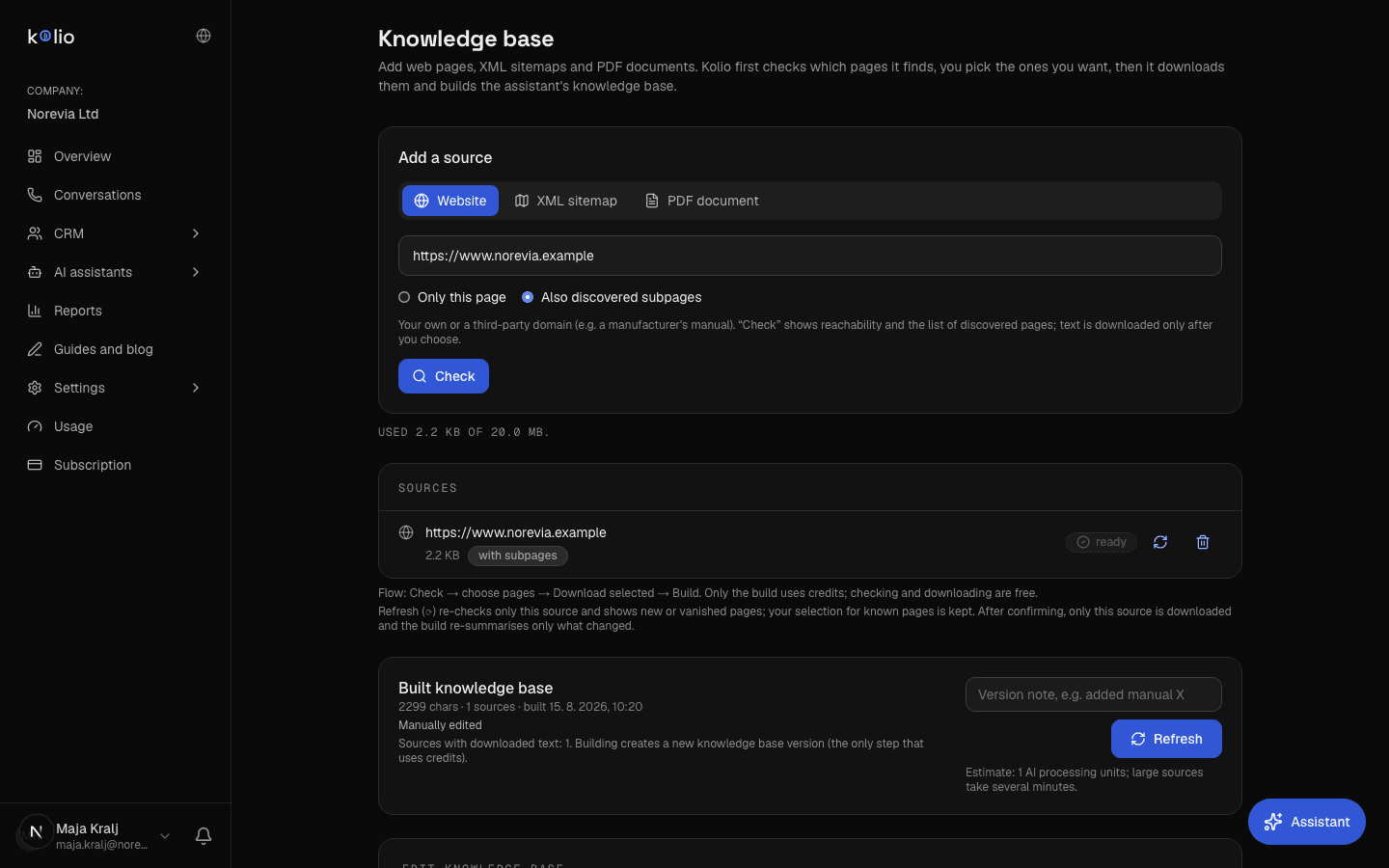
Price list for the AI agent in the knowledge base (PDF or URL)
Upload the price list as a PDF or enter a web page address; Kolio condenses the text into the knowledge base (up to 20 MB of sources in total), which is manually editable and versioned. Works for products and services without live stock data.
AI checks stock live over MCP
For stock, variants and lead times that change during the day, Kolio calls the MCP server of your online store or ERP — read-only by default, with only the tools on your list enabled. There are no built-in connectors for brands; the path is the vendor's MCP server or one built during onboarding.
| Source | Freshness | Effort | Suits |
|---|---|---|---|
| Service catalogue in Kolio | immediate — the agent reads it on every question | manual entry of services; no files or connections | service businesses: consultations, appointments, check-ups, visits |
| Price list in the knowledge base (PDF or URL) | on rebuild — one click when the price list changes | a few minutes: upload a file or enter an address | products and services with a stable price list, descriptions, terms |
| Live connection over MCP (store, ERP) | live — the value from the system at the moment of the question | vendor's MCP server or built during onboarding; Growth plan | stock, variants and lead times that change during the day |
Sources can be combined. The knowledge base accepts web pages and PDFs, up to 20 MB in total; the live connection over MCP is in the trial and the Growth plan.
02 · What it may say
What may the AI agent say about price — and what does it hand to your sales team?
The Kolio AI agent may state the public price, duration and availability as written in the catalogue, price list or connected system; it does not set volume, bundle or individual prices but records them and hands them to your sales team as a task in the CRM.
You set the boundary in the agent instructions in plain sentences — for example "do not quote prices to B2B buyers, take their contact details". In the demo call to the company Norevia the agent gives the regular consulting price (€120 for 90 minutes), records the question about a bundle price for three sessions for sales and books the buyer a free introductory consultation over the phone.
| Service | Duration | Price | What Kolio does |
|---|---|---|---|
| Introductory consultation | 30 min | free | gives the price and books the slot itself |
| Consulting | 90 min | €120 | gives the price and books the slot itself |
| Online meeting | 45 min | €60 | gives the price and books the slot itself |
| Support | 60 min | €80 | gives the price and books the slot itself |
| Implementation | 4 h | on quote | takes the contact, your sales team issues the quote |
Service catalogue of the demo company Norevia; Kolio does not set bundle or individual prices — it hands them to your sales team.
03 · Product catalogue
Product catalogue for the AI agent: how does it check stock and variants?
The AI checks stock by calling a tool of your store's or ERP's MCP server during the conversation, reading the answer and saying it — the value comes from the system at the moment of the question, not from yesterday's export.
The AI agent reads the product catalogue only through the tools you have enabled; by default these are read-only tools, and the list is set by the server and your allowlist. If the system does not answer within the time limit (4 seconds in a phone call, 10 seconds on the web), Kolio does not retry, tells the customer the status is unconfirmed and creates a task for your team. How the connection works as a whole is described on the MCP and API page.
Stock
"Is it in stock?" — the agent reads the status for the chosen product and says it; it never guesses quantities the source does not return.
Variants
Size, colour, model: the agent says which variants are available and at what price, when the catalogue distinguishes them.
Lead time
When the store or ERP returns a lead time, the agent says it; when it does not, it offers the customer that your team will confirm the date.
04 · Refreshing
How often is price and stock data refreshed?
Price and stock data in Kolio is refreshed at a different pace depending on the source: the service catalogue immediately, the knowledge base on rebuild, the live connection over MCP on every question.
For a price list that changes a few times a year the knowledge base is enough — when it changes, upload the new file and click "Refresh"; manual corrections are made directly in the built content, every change is a new version and the old ones stay in the history. For stock that changes during the day, the only reliable source is a live connection.
Service catalogue: immediately
A price you change in Services applies in the next conversation — the agent reads the list on every question.
Knowledge base: on rebuild
Upload the new price list or refresh the web page and click "Refresh". A rebuild creates a new version; enter manual corrections you want to keep after the rebuild.
Live connection: on every question
The agent reads the value from the system at the moment of the question. After three consecutive server failures it pulls the server out of conversations for five minutes and then tries again.
Definition
Price list for the AI agent is, in Kolio, the source the agent answers about price and stock from: the service catalogue, a price list in the knowledge base (PDF or web page) or a live connection to the store or ERP over MCP. The agent says only what it reads in the source; individual prices and quotes are handed to your sales team.
How to set it up
How do you set up price and stock for the AI agent in three steps?
You set up price and stock in Kolio without programming; programming is needed only for a live connection when no MCP server exists for your system yet. How Kolio works as a whole is described on the How it works page.
01 Choose the source: catalogue, price list or live connection
Enter services with prices in Services. Upload a product price list as a PDF or enter the web page address in the Knowledge base ("Capture content") and build the base. For live stock, add the MCP server of your store or ERP in Settings → MCP sources and integrations with the read-only policy.
02 Write what the agent may say about price
In the agent instructions, set the boundary in plain sentences: it states public prices and availability, records volume and individual prices and hands them to your sales team, and never issues quotes.
03 Test in the simulator and switch on the channels
In the call or web simulator ask about price, stock and a discount, then check the answers and the tasks created. Then switch on phone, Web agent and email — all read the same sources.
FAQ
Frequently asked questions about price and stock for the AI agent
How often is the price list for the AI agent refreshed?
A price list in Kolio's knowledge base is refreshed on rebuild: when you upload a new PDF or the web page changes, you click "Refresh" and from that moment the agent answers from the new version. Service prices in Kolio's catalogue apply as soon as they are saved, and data from a live connection over MCP is read on every question.
Can I hide prices from B2B buyers?
You hide prices from B2B buyers in the Kolio agent instructions: in plain sentences you state which prices it must not quote, for example "do not quote prices to business buyers, take their contact details and record the inquiry". The agent then takes the buyer's details and creates a task for your sales team in the CRM, and never issues a quote itself.
In what format do I upload a price list to Kolio?
You upload a price list to Kolio's knowledge base as a PDF or enter a web page address from which Kolio captures the text itself; all sources together may total up to 20 MB. Save a price table as a PDF, while services with duration and price can be entered directly in the service catalogue, from which the agent also books appointments.
Does the Kolio AI agent check stock live?
The Kolio AI agent checks stock live when it is connected to the MCP server of your online store or ERP: during the conversation it calls a read-only tool, reads the status and says it. Without a live connection it answers from the knowledge base, which holds no current stock data — it then tells the customer that your team will confirm availability.
Can Kolio change a price or issue a quote on its own?
Kolio does not change prices and does not issue quotes: it reads external systems read-only by default, and records a quote, proforma invoice or discount as a task for your sales team in the CRM with the conversation transcript. Writing to an external system becomes possible only when you choose the "Allow changing data" policy for that source and enable the tool individually.
What does Kolio answer if the price is not in the price list?
If the price is not in the catalogue, knowledge base or connected system, Kolio does not guess: it tells the customer that your team will confirm the price, takes their contact details and creates a task in the CRM. It does the same when the external system does not respond within the time limit (4 seconds in a phone call, 10 seconds on the web) — it does not retry the call.
Does Kolio support Shopify, WooCommerce, Pantheon or Minimax for stock?
Kolio has no built-in connectors for individual brands; it reads stock from Shopify, WooCommerce, Pantheon, Minimax or your own system through an MCP server provided by the vendor or built during onboarding. The live connection over MCP is included in the 7-day trial and the Growth plan (€149 per month); a price list in the knowledge base is in every plan.
Upload your price list — the agent answers today.
A PDF or web page into the knowledge base, services into the catalogue, the boundary in the instructions. Test in the simulator, no credit card.
Free for 7 days · cancel any time
Read next