Integrations · Service & work orders

AI for service calls that reads the work order.
"Is it repaired yet?" Kolio knows.

Kolio is AI for service calls: when a customer asks whether a repair is done, it reads the work order status from your service system via MCP and answers by phone, chat or email. It books the pickup itself in the Calendar; repair pricing goes to your technician as a task in the CRM, and it never guesses a status.

Free for 7 days · no credit card · MCP integrations are included from the Growth plan

Call in progress· 0:00
Rob Baxter
Baxter Logistics Ltd · Wed 10:02
Phone call …
Kolio · call to the demo company Norevia · Wednesday 10:02 · the customer describes a problem, Lina creates a support task and books a slot — the same flow as in a repair shop

Prepared by the Kolio team · updated

What the customer learns

What does the customer learn from the repair status: state, pickup, price?

A repair status integration in Kolio means the agent reads the work order from your service system during the call and tells the customer three things: what state the repair is in (received, in progress, waiting for a part, done), when and where it can be collected, and which items are on the price list. It identifies the customer first — by name, phone number or work order number — and passes that value to the system's tool, which returns the order only on a match. What is not in the order it never guesses: if there is no expected date, it says so and creates a call-back task for the technician. Fault assessment and custom pricing always go to the technician. Why it matters: according to Zocdoc, nearly 40% of appointments are booked outside working hours — when hands are busy or the shop is closed.
Repair status from the integration: state of the repair

"Is my bike fixed yet?" Kolio reads the work order state at the moment of the question — received, in progress, waiting for a part, done — and the expected date if it is recorded. It never changes the state or guesses a date; with no date in the order it says the technician will call back and creates a task.

Service system

Service system integration: what works with your software — and what without it?

The service system integration runs through an MCP server for your software — Kolio has no plugins for individual service programs; it talks to every system through the same standard: when an MCP server for your service program or ERP already exists, you enter its address and credential; when it does not, we build one at onboarding as a thin layer over the system's API, as part of a dedicated Kolio or a consultation. The policy defaults to read-only and the list of enabled tools is empty on connection. Without a system Kolio does not know the repair status and never guesses it — but it still takes the call, creates a task for the technician and books the pickup in the Calendar. Technical details are on How we integrate (MCP, API).

Service program via MCP

Your service program offers an MCP server, or we build one at onboarding. Kolio reads the work order state, expected date and items and answers the customer itself. Only the tools you enable get through.

Work orders in your ERP

If you keep work orders in an ERP (Pantheon, Minimax, Vasco or another), the path is the same: an MCP server over the ERP's API, read-only, tool allowlist. More on the ERP & CRM page.

No system: knowledge base and tasks in Kolio

Prices, opening hours and procedure from the knowledge base; pickup slots in the Kolio Calendar; every question about repair status as a task for the technician with the transcript. Kolio does not know the status — and does not hide that from the customer.

Pickup and price

How does Kolio book the pickup itself but hand repair pricing to the technician?

The pickup slot is the only transaction Kolio completes on its own in a repair shop: a free slot is the intersection of the location's opening hours and the staff member's availability in the Calendar; it confirms the booking by email and sends a reminder at 7:30 on the day — see Appointments, viewings, meetings. Repair pricing it never sets: when a customer asks how much a screen replacement costs or why the car rattles, it records the description, takes the contact and creates a task for the technician in the CRM. According to Harvard Business Review, only 37% of companies answered an inquiry within an hour — Kolio records it in the same call; the technician decides.
Mon
Tue
Wed
Thu
Fri
8:009:0010:0011:0012:0013:0014:0015:0016:0017:00
Intro call · Gallagher
Consulting · Whitfield
Support · Vance
Implementation · Whitfield
Consulting · Norris
Intro call · King
Lina checks the calendar for Thursday afternoon …
Kolio Calendar · Lina checks free slots and books the pickup — the same mechanism as for any other appointment
What the customer learns from Kolio in a repair shop, from which source, and who confirms it
What the customer learnsSourceWho confirms
Whether the repair is done and its current statework order in the service system via MCPnobody — Kolio answers from the data; without a system, a task for the technician
Expected completion datework order, if a date is recordednobody; without a date the technician calls back
When and where to collectopening hours from the knowledge base + free slot in the Calendarnobody — Kolio books the slot itself
Rescheduling or cancelling the pickupKolio Calendarnobody — Kolio reschedules or cancels
Price-list items (minor service, battery replacement)price list or knowledge basenobody — Kolio quotes the price list
Fault assessment and custom pricedescription and contact in a task with the transcripttechnician
Warranty, complaint, exceptionconditions from the knowledge base; request in a tasktechnician or service manager
Changing the work order state in the system—your team; writing only with the "allow changes" policy
~40%
of appointments are booked outside working hours, between 5 p.m. and 9 a.m. — when nobody is at the phoneSource: Zocdoc
37%
of companies answered an inquiry within an hour; 23% never did (audit of 2,241 companies)Source: Harvard Business Review
29%
fewer no-shows with automated reminders (weighted average across 29 studies)Source: Hasvold & Wootton, Journal of Telemedicine and Telecare, 2011
Work orders

Work orders and the AI agent: what does Kolio read and what does it never write?

For the Kolio AI agent, work orders are a source to read, not to write: through the service system's tools it reads the state, expected date and items of the order, but it never changes the state, closes orders or promises dates that are not in the order. Whatever the customer wants changed — an extra repair, a cancellation, a complaint — becomes a task for your team in CRM & tasks with the conversation transcript. Writing to the service system becomes possible only after you switch the integration policy to "allow changes" and explicitly enable the tool; even then the agent asks the customer to confirm before writing, waits up to 12 seconds for the answer and never retries.
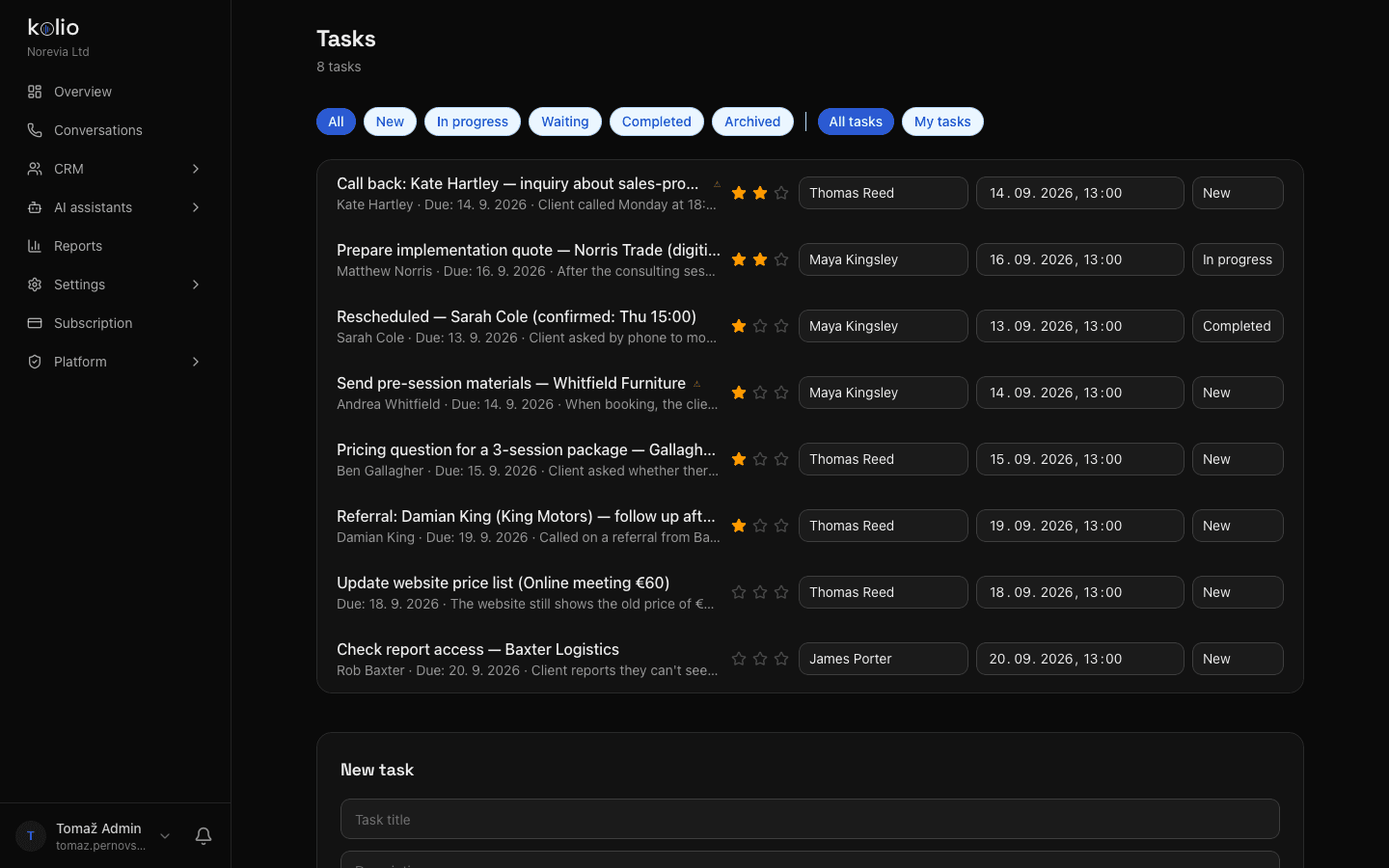
Kolio CRM — task list for the team of the demo company Norevia with assignee, priority and due date; the technician gets the same list for call-backs about repair pricing and complaints created by the AI agent
Kolio CRM & tasks: what the agent hands to the technician is a task with an assignee, due date and call transcript

Reads

Work order state, expected date, items and notes the system returns through the enabled tools — at the moment of the question, with no caching.

Never writes without permission

It does not change the order state or close the order. Writing to the system goes through only with the "allow changes" policy, an enabled tool and the customer's confirmation.

Definition

AI for service calls is an agent that tells a repair shop's customers the repair status from the work order by phone, chat and email, books the pickup itself and hands repair pricing questions to the technician as a task. Kolio reads the work order through an MCP integration with the service system; without a system it takes the call, creates the task and books the pickup, but never guesses the status.

Integration steps

How do you connect your service system to Kolio in three steps?

You connect your service system to Kolio in the settings, without touching the system: you need the MCP server address and a credential; the rest is choosing tools. MCP integrations are available from the Growth plan (enabled during the 7-day trial). Without a system you start right away: the Calendar, knowledge base and tasks work from day one.
  1. 01

    Enter the service system's MCP server

    In Settings → MCP sources add a server: name (e.g. Service program), https:// address and authentication (none, Bearer token or custom header). The credential is stored encrypted. The policy stays "read-only". If no server exists for your program yet, we build one at onboarding.

  2. 02

    Test the connection and enable tools

    Click "Test connection" — Kolio reads the tool list and shows for each whether it reads or changes data. Enable only what the agent needs: work order state, expected date, items.

  3. 03

    Set up the pickup service and instructions

    In the Calendar create a "Pickup" service with duration and technicians; in the instructions describe how the agent should identify the customer and what it hands to the technician; add the price list and opening hours to the knowledge base. Then ask "is it repaired yet?" in the simulator and check the answer.

FAQ

Frequently asked questions about AI for service calls

We have no service system — does Kolio work with Excel or with no software at all?

Kolio works in a repair shop without a service system too: it takes the call, books the pickup in its own Calendar, quotes prices and opening hours from the knowledge base and records any question about repair status as a task for the technician with the transcript. Without a system it does not know the repair status and never guesses it; it does not read Excel spreadsheets live — a price list from one can be uploaded to the knowledge base.

Does Kolio notify the customer itself when the repair is done?

Kolio does not notify the customer automatically when the technician closes the work order in the system — it gives the status when the customer calls, writes or asks in chat. What it does send on its own is the confirmation and reminder for the pickup slot it booked (an email at 7:30 on the day, in the company's time zone).

Which service programs does Kolio work with?

Kolio connects to a service program or ERP as an MCP client through an MCP server for your system; it has no plugins for individual programs. When such a server already exists you enter its address; otherwise we build one at onboarding over the system's API — as part of a dedicated Kolio or a consultation.

Does Kolio quote repair prices?

Kolio quotes price-list items such as a minor service, battery replacement or diagnostics from the price list or knowledge base. It never sets a fault assessment or custom price: it records the description and contact in a task for the technician and tells the customer who will call back and when.

Can Kolio change the work order state in our system?

By default Kolio does not change the work order state or close orders: the integration policy is read-only and changes are recorded as a task for your team. Writing to the system becomes possible only when the company switches the policy to "allow changes" and explicitly enables the tool; even then the agent asks the customer to confirm before writing.

What happens if the service system does not respond during a call?

If the system does not answer within 4 seconds during a call (10 seconds in chat and email), Kolio tells the customer it cannot confirm the status right now and creates a task for the technician; it does not retry the call. After three consecutive outages the integration is paused for 5 minutes and the agent works from the knowledge base.

AI for service calls — start for free.

Create a "Pickup" service in the Calendar, upload your price list to the knowledge base and connect your service system via MCP. No credit card.

Free for 7 days · cancel any time · MCP integrations from the Growth plan

Read next